
Stop over-engineering. Start leveraging your in-office spaces more effectively.
Let’s get one thing straight: Teams Rooms and Zoom Rooms have their place. They’re great. Walk into a room, push a button, and you’re off to the races. Camera’s on, mics work, content is shared. No swearing at dongles or crawling under tables to find a port.
But here’s the thing: That “magic” setup isn’t always the smartest play when it comes to every meeting space in your office.
If you’re running a hybrid workplace (or even just hopping on a few virtual calls a week) it’s tempting to go all-in on standardized Teams or Zoom Rooms. But is that really solving your biggest collaboration problems? Or are you quietly making your office more rigid, more expensive, and less useful for the way people actually work?
Hybrid Convenience vs. In-Person Reality

Here’s where it gets awkward. Those beautiful conferencing setups that make hybrid calls a breeze? They often come at the cost of in-person experience. We’ve all been there: five people in the same office, but you still join the meeting from your desk because the room setup makes it easier to conference virtually than meet face to face. The conference room might be well-suited for hybrid meetings but using the space to conference for “non-virtual” meetings? Actually being with your co-workers instead of staring at your own video reflection on your screen? Meh, no thanks.
That’s . . . silly, right?
Worse, it’s wasteful. Of space. Of money. And of the reason you asked people to return to office in the first place.

Our behavior and conditioning around meetings has fundamentally changed because of Teams and Zoom. And a lot of these changes were necessary throughout the COVID-19 pandemic to support a more flexible, resilient workforce. One that had to adapt through years’ worth of work-from-home challenges to come out on the other side asserting better work-life balance. Much of the widespread professional flexing we’ve done in the past few years will continue to benefit workers long-term, but many aspects of today’s remote work norms don’t suit people’s needs, especially when it comes to the benefits of daily socialization and connecting with your colleagues face-to-face.
All of this to say: if coming into the office feels the same as working from home (but with a longer commute and less snacks), what are we doing here?
One-Size-Fits-All ≠ Smart Design
Teams Rooms and Zoom Rooms are built for hybrid meetings. Not for impromptu 1:1s. Not for small group huddles. Not for quick brainstorms where someone wants to throw a slide deck up on the screen (without launching a virtual call to do it).
But in a lot of office setups today, if you want to share content to the in-room display . . . guess what? You have to fire up a Teams or Zoom meeting. Not because someone’s remote. Not because it’s a hybrid call. Just because the room is configured that way.
Here’s a better question: What if you could walk into a room – any room – and share content wirelessly, from any device, without needing to launch a virtual meeting? What if you could do that and still have rock-solid hybrid performance when you needed it?
That’s the flexibility modern workplaces need.
Overkill Costs More Than You Think

Let’s talk numbers for a second. Dedicated conferencing rooms aren’t cheap. Between hardware, licensing, and setup, you’re easily looking at thousands (or tens of thousands) per space. That’s a worthy investment in the right room but a questionable choice when applied everywhere.
When you over-engineer spaces that don’t need full-time hybrid capability, you’re not just overspending. You’re adding friction, complexity, and more stuff to troubleshoot when things go sideways.
All that tech? It’s supposed to make collaboration easier. Not make you jump through digital hoops to present a slide. Your team’s in-person meetings should be productive and engaging but an overly complicated collaboration setup contributes too many points of friction for an otherwise simple objective to be met.
A Smarter Way to Equip Every Space
You don’t need to rip out your Teams Rooms or Zoom Rooms. Keep them where they shine in your big conference rooms, your boardroom, and your hybrid-heavy zones.
But everywhere else? There’s a better, lighter-weight way.
Solutions like Mersive Smart, Mersive Essentials, and Mersive Pro give you flexible, wireless content sharing that works perfect for in-person meetings. No cables. No launching a video call to show a spreadsheet. Just walk in, share, and go.
And what about when you want to leverage your conference rooms for in-person meetings, but they’re set up as Teams Rooms or Zoom Rooms? Mersive solutions enhance your existing conferencing spaces in tandem with your existing tech stack, unlocking multi-user sharing and even digital signage with calendaring integrations for those down times between meetings. Your displays can work double-duty to communicate with your team, not just display a static page with upcoming meetings. Your conferencing spaces are underutilized anyway. Make sure that they’re equipped for in-person experiences as well as hybrid experiences to prove return on your office space investment.
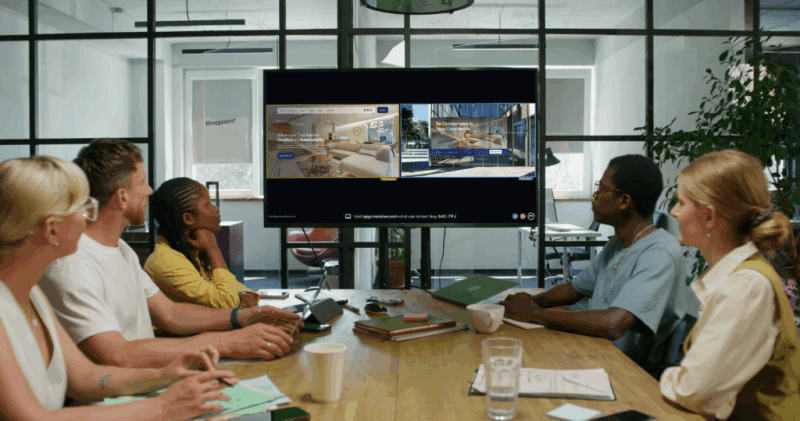
Solutions like Mersive Essentials and Mersive Pro even integrate with active Teams and Zoom Rooms and enhance the conferencing experience to let multiple users, be they remote or in-room, share content without wrestling for control or toggling back and forth like it’s 2011. Everyone on the call can view the in-room display. Everyone remote or in person (without having to join the virtual call) can share content to the display and multiple users can do so at once. Not only does this mean your Teams Room or Zoom Room can now display unlimited shared windows of content from multiple users, but it also means that every participant gets the same experience without anyone left out of the meeting magic. Everyone’s contributing. Everyone’s on the same page.
And what if you need the option for hybrid meetings in spaces outside of your dedicated conferencing rooms, but you don’t want to over-equip smaller meeting rooms or huddle spaces with a full-fledged Teams Room or Zoom Room? Mersive Pro is a great solution to enable virtual conferencing in mid-sized rooms, device-agnostic to suit your choice in camera, microphone and speaker, or all-in-one video bar.
Use the Right Tool for the Room

Bottom line: Not every room needs to be a spaceship.
Smart organizations know it’s not about having more tech. It’s about having the right tech, in the right spaces, to support how people actually meet, work, and collaborate.
Your conference rooms should support your whole team which includes remote and in-person contributors without making anyone jump through hoops. And that starts by not over-committing to a solution that solves only half the problem.
Choose flexibility. Choose usability. Choose collaboration that actually works for everyone in the room (any room), and everyone on the call.