捲動
任何會議。一個無線屏幕分享平台。 Mersive Polaris 能將任何顯示器變成共享工作區。手提電腦從瀏覽器分頁分享,手機則透過 Mersive 應用程式或原生通訊協議分享。畫面並排呈現、多路同時分享,可跨任何網絡。
開始免費試用 了解運作方式 無需安裝用戶端 支援任何會議平台 通過 ISO 27001 認證、SOC 2 鑑證
9K+ 全球組織採用
200K+ 間受管理的會議室(雲端與地端)
15 年 Mersive Solstice → Polaris 的傳承
10 年 承諾的平台生命週期
2× AVTechnology Best in Show 與 SCN Installation Product Award,InfoComm 2025 與 2026(Polaris · Host,在 InfoComm 以 Mersive Tablet 之名展出)
平台
四種工作負載,一個 Polaris 平台。 Polaris 讓每一台顯示器都具備無線屏幕分享、混合會議與數碼標牌能力。Polaris Cloud 是單一管理介面,負責這三項的部署、監控與更新:每間會議室、每個據點,一次登入。
01 無線屏幕分享 任何裝置,無需安裝 02 Hybrid 會議 BYOD、BYOM、BY 03 數碼標牌 每一台顯示器,均已內含 04 機群管理 一次登入,掌握每間會議室
平台 · Polaris 的與眾不同之處
Mersive Polaris 的優勢 原生 Teams、Zoom、Webex、Meet Polaris 會議室執行的是當次會議所選的會議平台,而不是固定綁在會議室上的平台。
Polaris 會議室執行各廠商自己的原生用戶端,所以聊天、版面配置和 Copilot 都是 Microsoft 與 Zoom 原本推出的版本,而不是在另一家廠商的畫布中重新繪製的版本。會議室執行哪個平台是依每場會議選擇,而非安裝時就固定:上一場用 Teams、下一場換 Zoom,不必重新開機,也不必更換設備。而且搭配 Polaris Host,BY 讓會議室自行執行並控制混合會議,無需依賴用戶的裝置。哪些廠商會重新繪製、哪些不會,各家自己的說法都整理在比較矩陣 中。
不受平台限制的混合會議 → 企業級資訊保安,有據可查 Polaris 出廠即啟用安全開機,並採用符合 TAA 規範的供應鏈。
已通過 ISO/IEC 27001:2022 認證,在 2026 年 6 月的監督審核中沒有任何不符合事項。Polaris 雲端已取得 SOC 2 Type 2 鑑證,會議室裝置也經過第三方評估。2026 年 7 月的應用程式評估未發現任何嚴重或高風險問題。線路上採用 802.1x/EAP-TLS,所有內容都有書面記錄,供您的資訊保安團隊查閱。
信任中心 → Polaris Cloud Polaris Cloud 承載整個部署的分析、啟用與機群管理。
Mersive Solstice Cloud 繼續管理您的 Gen 3 部署,並可從 Polaris Cloud 直接連結:遷移期間只需一個起點。
探索雲端平台 →
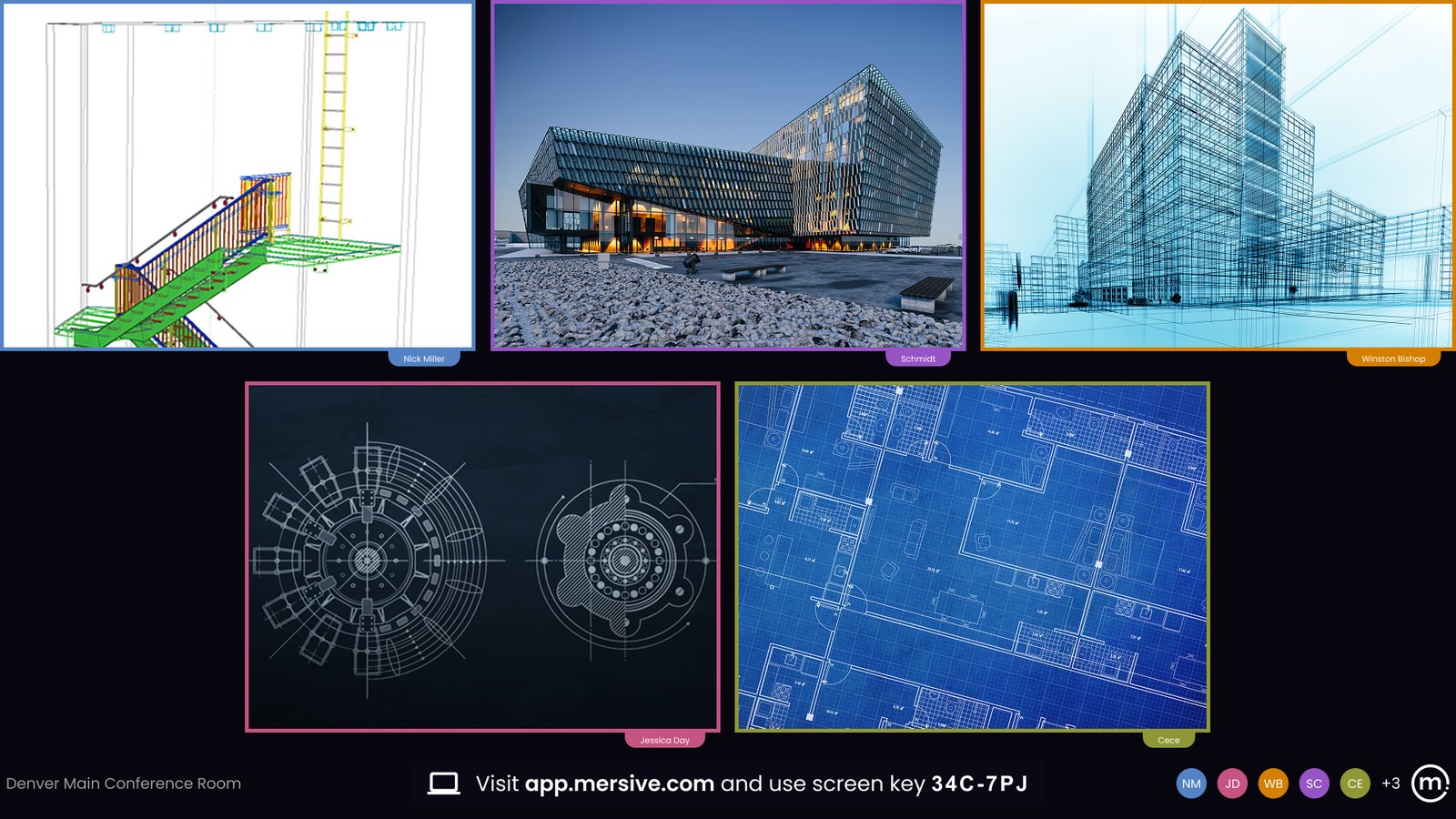
多路分享工作區 Polaris 工作區將所有分享畫面並排呈現,可從任何座位控制。
真正的合成式工作區:即時比較、註記、重新排列。互動平板只在自己的屏幕上合成畫面。Polaris 則在合成後把整個畫布重新編碼輸出,既送給從未加入通話的遠端參與者,也送到任何裝置上的瀏覽器。這就是會議對等:會議室裡的每個人與遠端的每個人,在同一時間看到相同的內容,沒有人只能看到次一等的畫面。這正是互動平板廠商尚未跨越的那條線。
工作區為何更勝一籌 → 從瀏覽器分享 Polaris 從瀏覽器分享:不需用戶端、不需管理員權限、不需投影接收器。
訪客用隨身帶來的任何裝置幾秒內即可分享,Chromebook 也不例外。
網頁加入的運作方式 → 跨網絡分享 Polaris 可跨 VLAN、子網絡、建築物與互聯網分享,無需 VPN。
Mersive 只負責訊令:雲端為兩端牽線後便退到一旁,媒體透過直接加密的 WebRTC 連線點對點傳輸。您的內容從不經過我們的雲端。訊令僅以連接埠 443 上的出站 TLS 進行,因此訪客、其他 VLAN 與遠端裝置無需 VPN、也無需開放任何入站連接埠即可連到會議室。
查看架構 → 依產業
向某個人負責的會議室。 會議室在任何地方都是同一個平台。不同的是由誰簽核:採購部門、學期課表,還是審計人員。
階梯講堂、平面教室與共用教學空間,客座講師的手提電腦必須在上課的第一分鐘就能用。
K-12 高等教育
在會議室獲准採用之前,架構必須先有書面記錄:開機鏈、網絡安全態勢、資料路徑、更新政策。
醫療 金融服務
問題與解答
人們為何而來,以及為什麼 Polaris 對每一位必須與它共事的人都很簡單。 01 問題
投影接收器經常遺失,形成持續性的開支。 投影接收器是按座位另外採購的硬件,一旦遺失就得再買一個。它也是又一項需要備貨、維護並保持連上網絡的庫存設備。
01 解答
對 AV 管理者很簡單 Polaris 從瀏覽器分享,用的是每個人原本就隨身攜帶的裝置。不必按座位採購、沒有東西會遺失,也不必在抽屜裡放任何東西。
所有會議室集中在同一個雲端管理面板:坐在辦公桌前就能部署、監控並更新整個部署。更少的工單、更少的到場維修、更輕的支援負擔。
02 問題
訪客沒辦法把投影片放上屏幕。 分享往往意味著得先讓訪客連上企業網絡:要安裝應用程式、建立帳戶,或向 IT 申請防火牆例外。簡報只能留在他們的手提電腦上,整間會議室都在等。
02 解答
對用戶很簡單 訪客不必加入企業網絡就能從瀏覽器分享:不需應用程式、不需帳戶,也不必申請防火牆例外。
走進會議室、打開瀏覽器、開始分享。不需應用程式、不需下載、不需訓練,訪客也一樣。
03 問題
會議室被綁死在單一會議平台與單一 OEM 上。 經過認證的會議室系統在設計上只承載單一平台的會議,一家廠商被固定在會議室上,在硬件的整個使用壽命內都得依附於那個生態系。
03 解答
對系統整合商很簡單 Polaris 不限定用戶要部署哪一套會議系統,並能在幾秒內從一套切換到另一套。不必重新開機、不必更換設備。Link 僅隨 Polaris Pro 提供,而 Polaris Host 可加裝到任何 Polaris Pro 或 Essentials 會議室。
一條線接到顯示器,Pro 採 PoE+ 供電(Essentials 使用 12V 變壓器),雲端啟用:從上架到運作非常快速,且能依公開的規格表直接報價。
10-year平台
比起 每 五年 就要 汰換 一次的 機器, 成本 更低。 產品生命週期
以軟件為本,由硬件賦能。安裝一次,每一季都更好。 以硬件為本的產品不是老到被淘汰,而是停止進步。Polaris 訂閱則持續向前:更新、資訊保安與新功能,而且只要您持續訂閱就享有保用。不必整批汰換硬件,也不必另簽維護合約。
即使訂閱到期,會議室設備也不會變成磚塊:本地無線分享照常運作。
10+ 年 · 一次安裝
無線屏幕分享與鏡像
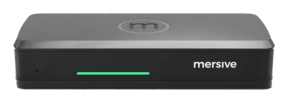
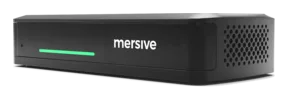
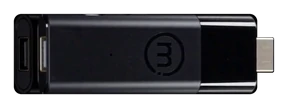
選擇您的 Polaris 硬件 Polaris 是同一個平台,提供三種機身。三者執行相同的軟件,開啟相同的 Mersive 工作區。隨硬件提升的是 I/O、可同時分享的訊號源數量,以及會議室所能驅動的設備。
一個軟件平台 · 三種硬件版本,依每一種會議室的規模量身搭配
從 Mersive Solstice Gen 3 升級?Pro 延續您的產品線 → · 還不確定?四個問題 →
屏幕分享與工作區
屏幕。工作區。Cloud。 Polaris 從原生屏幕鏡像止步之處開始。AirPlay、Miracast 與 Google Cast 每次只能把顯示器交給一台裝置。Polaris 在它們背後加上了Mersive Workspace :一塊共享畫布,多個訊號源可同時並排呈現,既能透過原生投影進來,也能直接從瀏覽器進來。工作區不受限於區域網絡。坐在會議室裡的訪客、另一個 VLAN 上的同事,以及地球另一端的人,都能透過互聯網連到同一間會議室,不必架設 VPN、不必加入網絡,也不必開放任何入站連線。
畫布不只在牆上。app.mersive.com 為每個座位呈現相同的工作區,無論在會議室內或遠端,所以沒有站在顯示器前的人看到的也不是次一等的畫面。而且每一台顯示器都由同一個雲端運行,不論是單一會議室,還是數千間會議室的整體部署。三個層次共同成就這一切:
顯示器 您現有的任何顯示器都能成為 Polaris 端點:會議室顯示器、教室屏幕、大廳牆面。
工作區 每一路分享都並排落在顯示器上,可來自手提電腦、手機,或無需安裝任何東西的瀏覽器,而且可來自任何網絡,不限於會議室所在的網絡。
雲端 中介者兼機群控制台:它牽起每一場工作階段、運行每一間會議室,卻不介入媒體路徑。
分享如何抵達會議室 往下捲動:每一次分享都經過相同的三個步驟,無論這個人是在會議室裡,還是在地球的另一端。
How a share reaches the room, in three steps
Step one, join: the laptop, the phone, the Polaris pod and a remote participant in a browser each send a short signaling ping up to Polaris Cloud and get an answer back: authenticate, resolve the screen key, exchange SDP and ICE. Step two, connect: direct links form between the endpoints and the pod, and the cloud drops out of the media path. Step three, compose: the shares land side by side on the display as one workspace, and the remote participant sees the same workspace live in the browser.
THE ROOM
direct
{/* THE LABEL LIVES INSIDE THE ICON. On one line at 14 it measured 131
against a cloud 96 wide and ran out both sides, and it was centered on
450 where the shape's own center is 465, so it was off to the left as
well. Two lines at 12 measure 59 and 42, which sit in the belly of the
cloud with 18 to spare. The green orb that used to ride above it is
gone on Damian's call, 29 Aug 2026. */}
POLARIS
CLOUD
authenticate · resolve the screen key · SDP + ICE
introduces the endpoints, then leaves the media path
Polaris pod
the workspace: every share, side by side
laptop · sharing
phone · sharing
REMOTE / APP.MERSIVE.COM
remote · sharing
The Mersive Workspace
the same workspace, live in the browser
How a share reaches the room, in three steps
Step one: the laptop, the phone and a remote participant in a browser each ping Polaris Cloud and get an answer back. Step two: direct links form down to the Polaris pod and the cloud leaves the media path. Step three: the shares land side by side on the display as one workspace.
THE ROOM
POLARIS
CLOUD
resolving the screen key
out of the media path
ALSO IN THE ROOM
ANOTHER NETWORK
laptop
phone
remote
Polaris pod
every share, side by side
1 加入 裝置向 Polaris Cloud 發起對外 連線,由其完成驗證、解析屏幕金鑰,並交換 SDP 與 ICE。 2 連線 雲端負責牽線,隨即退場。媒體透過直接連線 傳到 Pod:在會議室內,媒體從不離開大樓;從外部加入時,也從不經過 VPN。 3 組合 分享畫面在顯示器上並排呈現 ,組成單一工作區;同一個工作區也會即時呈現在瀏覽器中,供每一位不在會議室的人觀看。 運作方式 → 無線簡報常見問題,一次解答 →
Hybrid 會議
Polaris 提供兩種方式,讓會議不再綁在手提電腦上。 大多數會議室做到 BYOD 就止步了:由您的手提電腦主持,會議室只是一面屏幕。再往前一步通常得有所犧牲:會議室被鎖在單一會議平台上,或是靠一套橋接方案而失去原生用戶端,於是聊天、錄影和 Copilot 都不再是 Teams 或 Zoom 原本推出的版本。Polaris 混合會議技術提供不受平台限制的解決方案,同時保留原生用戶端的完整功能。
在 Mersive,我們看到三種具備混合會議能力的會議室模式。BYOD 把會議顯示在會議室顯示器上,但無法整合周邊設備。BYOM 把會議室周邊設備加入會議,讓會議能以無線方式使用攝影機條等裝置。BYOM 方案也可以在用戶的手提電腦或會議室裝置上主持會議。Polaris Link 是 Mersive 的 BYOM 方案,內含於 Polaris Pro。我們的 Link 方案把會議搬到 Polaris Pro 上執行,從而降低手提電腦的耗電與運算負擔。
在 Mersive,我們看到混合會議室的第三種模式:一套配備完整的會議室系統,我們稱之為「BY」,意思是只要帶上自己就好。在這類會議室裡,用戶不必自備裝置就能召開混合會議。Polaris Host 是 Mersive 的「BY」方案,作為 Polaris Pro 或 Polaris Essentials 的附加元件銷售。有了 Polaris Host,由會議室主持會議並從該裝置控制,任何人都完全不必帶電腦來。
Polaris Link 與 Polaris Host 都不會把會議室鎖在單一視像會議平台上。平台依每場會議選擇,每個用戶端都是廠商自己的版本,從一個切換到另一個只需幾秒,也不必重新開機。
三種混合會議室
meeting host:
your device
Polaris pod
(Pro / Essentials)
✕
✕
room microphone
laptop webcam carries the call
1 · BYOD:只靠您的裝置 您的屏幕投上顯示器,連同視像會議用戶端一起。 會議室顯示您手提電腦上的畫面,但不為通話增添任何東西:通話仍由手提電腦自己的網絡攝影機與麥克風承載。「該用誰的麥克風」或「誰該靜音」是用戶常遇到的問題。
meeting host:
laptop or pod
both are BYOM
Polaris pod
(Pro / Essentials)
or the pod, with Link
room camera
room microphone
the laptop can host
2 · BYOM:由手提電腦或 Pod 主持 會議得以使用周邊設備。 BYOM 把會議室的系統與周邊設備(例如攝影機條)帶進通話,而會議用戶端可在任一端執行:您的裝置,或會議室的裝置。Polaris Link 在 Polaris Pro 硬件上主持會議,為您的手提電腦卸下記憶體與電力負擔。
meeting host: the room
Mersive workspace
the VTC call
Polaris pod
(Pro / Essentials)
room microphone
Polaris Host
runs the room & the call
share from a phone
3 · BY:Polaris Host 「BY」讓會議室成為主持系統。 它自行發起、控制並分享混合會議,不需要任何用戶裝置。Polaris Host 搭配 Pro 或 Essentials,做到這一切而不被廠商綁定:原生的 Teams、Zoom、Webex 或 Meet 用戶端,依每場會議選擇,幾秒內即可切換。✕ 不在會議中
混合會議產品家族 → 比較其他方案 →
機群管理 · Polaris Cloud
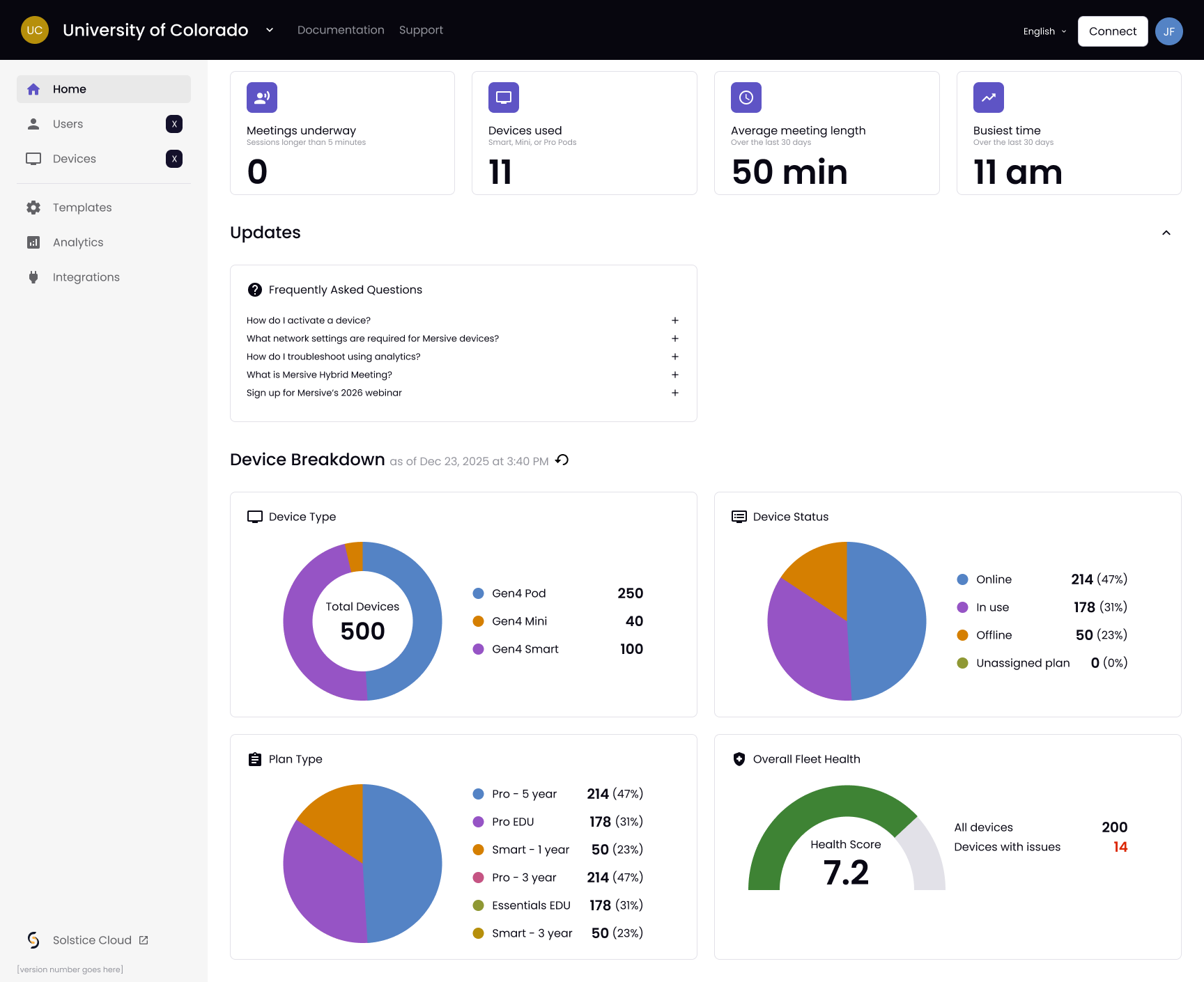
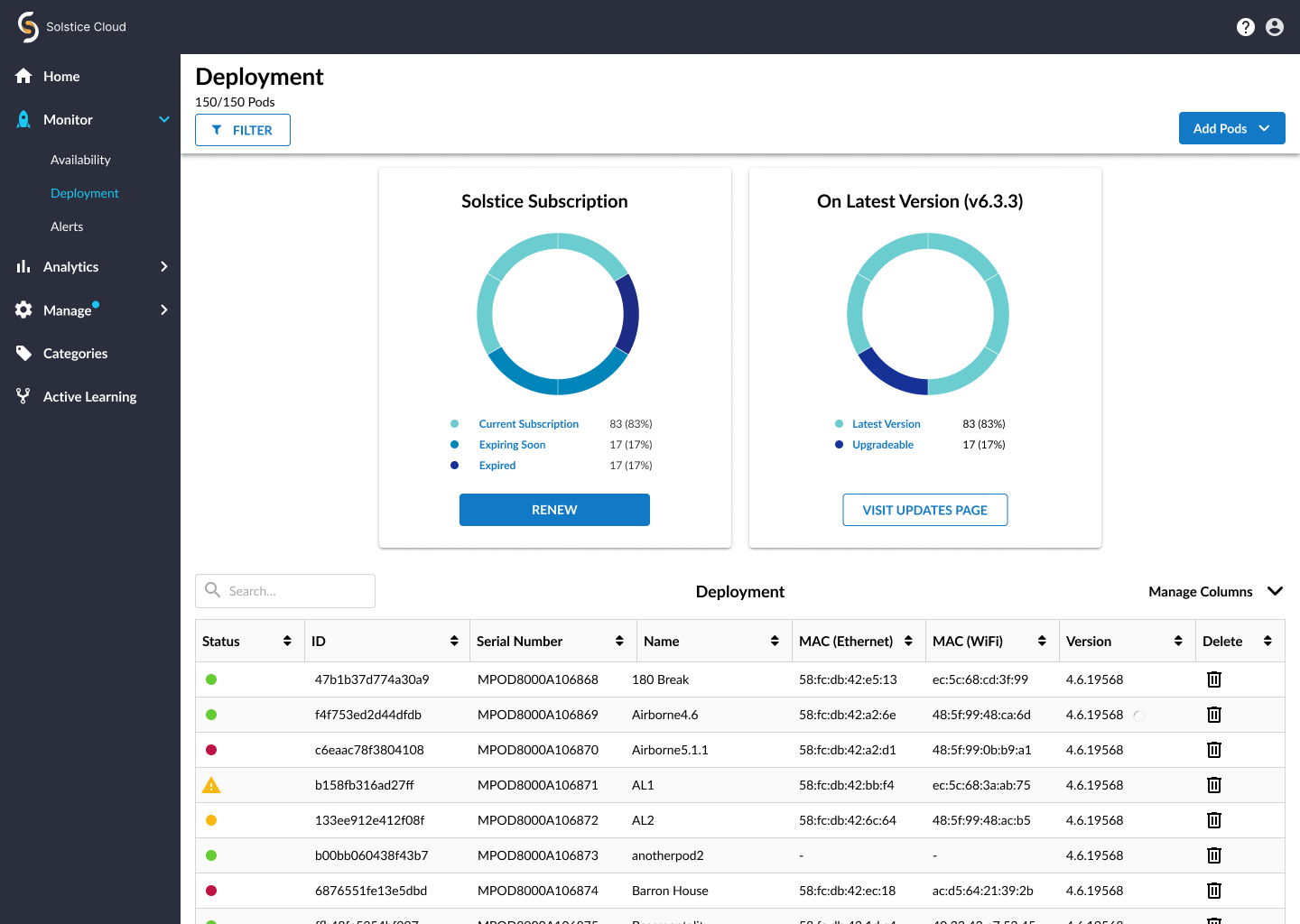
一次登入,掌管您擁有的每一間會議室。 Polaris Cloud 承載整個部署的分析、啟用與會議室管理。一次登入即可部署、監控並更新每個據點的每間會議室:依會議室類型套用範本、分階段推送韌體、健康狀態警示。
Polaris Cloud 面板:首頁儀表板。Solstice Cloud 面板:部署檢視。兩者皆為使用範例資料的產品屏幕截圖。
會議室管理不再是一棟一棟建築分別處理的工作。一次登入 就能坐在辦公桌前部署、監控並更新整個部署:依會議室類型套用範本,讓小型討論室和階梯講堂各自以該類型應有的方式完成設定;韌體安排在週末分階段更新,而不是在週二早上強行推送;健康狀態警示會在當天第一場會議發現顯示器故障之前先通知您。更少的工單、更少的到場維修,支援負擔也不會因為有人又加了一間會議室而不斷加重。
這一切都不必等遷移完成。Mersive Solstice Cloud 會一如今日繼續運行您的 Gen 3 部署,並可從 Polaris Cloud 直接連結,兩者並肩運作,會議室依預算的節奏遷移,而不是被軟件逼著走。一個起點、一次登入,也不會有哪個週末出現半數建築無人管理的情況。
Polaris Cloud 的運作方式,以及它能帶來什麼
How Polaris Cloud works, and what it delivers
An AV manager signs in once. The console, the REST API and the MCP server all reach Polaris Cloud, which reaches three room clusters: HQ, Campus West and EMEA, plus a linked Solstice Cloud holding the Gen 3 fleet. Templates and firmware travel out to the rooms; health and analytics travel back. One HQ room shows an alert. Meeting content never routes through the cloud.
{/* THE THREE CARDS ON THE LEFT CASCADE. The API card used to be in beat 1
and the MCP card in beat 4, which is the same column arriving at opposite
ends of the scroll and read as a fault rather than a sequence. Three
overlapping windows now: console, then API, then MCP, each starting before
the last has finished. */}
One login
AV manager · the console
Deploy by template
Health · analytics · firmware
Polaris API
REST
Your tooling on the same cloud:
dashboards, ITSM, automation.
Polaris Cloud
broker · console · API
Signaling and management only:
meeting content never routes through the cloud.
HQ
CAMPUS WEST
EMEA
Solstice Cloud
your Gen 3 fleet, linked
while you migrate
{/* ONE COLOR FOR THE WIRING (Damian, 29 Aug 2026). These two were green
and every other line in the figure purple, which asked a reader to work
out what the difference meant when there was none: they are all the same
cloud talking to the same rooms. Green is kept for STATUS only, which is
what the legend defines it as. */}
{/* THE HEADS ARE DRAWN, NOT MARKERS. A marker-end renders at the path's
endpoint whatever the dash offset is doing, so with a stroke that draws
itself the arrowhead was sitting at the far end waiting for its own line
to arrive, and on the leftward one it read as the head vanishing. Each
head is a path of its own now, and it lands when its shaft finishes.
The pair also takes turns: out over the first half of beat 3, back over
the second, which is what "back and forth" is supposed to look like
rather than two lines moving at once. */}
Template · room type: classroom
Room 4.12 · display offline
MCP server
SHIPS Q4 2026
AI agents and assistants operate
the fleet through the same API.
Polaris & AI →
The USB bus, per device
SHIPS Q4 2026
Camera · UVC
Mic and speaker · UAC
Touch display
visible from the cloud
healthy
alert
signage
啟用與管理 每台 Pod 在首次開機時向雲端啟用並加入整體部署。一次登入即可部署、監控並更新每個據點的每間會議室。 範本與設定 設定靠範本,而不是到場服務:定義一次會議室類型,第一百間會議室的部署就和第一間一樣,分階段韌體更新也包含在內。 分析與監控 健康狀態、警示與使用分析從每間會議室回傳,所以琥珀色的警示方塊會比工單更早找到您。 探索雲端平台 → 從 Gen 3 遷移 →
數碼標牌 · 已內含
您運行的每一台顯示器都能播放看板內容。 企業數碼標牌通常是第二套系統:另一個平台、另一份授權,大廳屏幕變黑時還得再打給另一家廠商。在這裡,它就是會議室已經在執行的平台。同一個Polaris Cloud 登入帳戶同時掌管兩者。
您已擁有的會議顯示器,在會議結束前與結束後。同一台 Pod,同一個登入帳戶。
大廳、走廊或員工餐廳裡的專用屏幕,和其他任何部署沒有兩樣。差別在於您已經買下的那些顯示器:只要沒有人在分享,會議顯示器就立即變成看板屏幕,而在一個工作週裡,這佔了它開機時間的大半。過去在預約之間一片漆黑的會議室,如今改為發布內容。
內容是動態且由事件驅動的,並快取在裝置上,所以即使網絡中斷,屏幕也會繼續播放,而不是在大廳所有人面前切換成藍色等待畫面。每一面屏幕都和每一間會議室一樣由同一個 Polaris Cloud 登入帳戶管理,所以不必再學第二套 CMS,也不必另外追蹤一套部署。數碼標牌已內含而非另行授權:沒有第二套播放器網絡、沒有第二份授權、沒有第二家廠商。
數碼標牌實際在哪裡執行 五種內容來源餵入,一個雲端發布,任何機身都能執行。只要沒有人在分享,會議顯示器就立即變成看板屏幕。
SIGNAGE: FROM CONTENT TO GLASS
FIVE WAYS TO FEED IT
Signage Publish content to any screen or group.
Dynamic signage Live data: dashboards, feeds and menus that update themselves.
Event-driven signage Triggered content: alerts take the screen the moment it matters.
Your calendar Room and campus calendars render straight to the glass.
Or just a URL Point a pod at a page and it defaults to it. That is the whole setup.
{/* CENTERED IN THE GAP, and the gap is measured: the cards end at 440, the
screens start at 886, so the midpoint is 663 and this silhouette spans
558 to 771, center 665. It sat at 434-620 before, which put its leftmost
point BEHIND the feed bus, because the first arc is a semicircle and the
shape reaches 42 further left than either of its endpoints. Same fault
the fleet figure had. It is also 13% larger, with all four arcs
re-checked: chords 95, 115.6, 76.3, 56.1 against diameters 95, 118.6,
86, 71.2. An arc whose chord exceeds its diameter is not an error, the
browser just inflates the radius, so the shape stops being the one
drawn. */}
Polaris Cloud
publishes · schedules · caches
{/* No arrowhead, and the same 2.5 every other connector carries. It was the
one line in the figure drawn heavier and tipped, which made it look like
a different KIND of connection when it is the same cloud reaching the
same rooms as the five feeding into it. Damian, 29 Aug 2026. */}
{/* ONE CONTINUOUS LINE from the cloud to the far chassis. It used to be two
paths with a 6-unit gap at 806, which was there to clear an arrowhead;
with the head gone the gap was just a break in the middle of the run.
The three drops stay separate, because they are branches off it rather
than part of it. */}
ONE CONTENT PLANE · ANY CHASSIS
Welcome
Launch
TODAY’S MENU
Essentials
AUDITORIUM A
11:00 All-hands
13:00 Design review
Pro
The same pods that run your meeting rooms. A meeting display
becomes a signage screen the moment nobody is sharing.
Cached locally at the pod:
the screen keeps playing if the network blips.
Included, not licensed separately:
no second network of players, no second vendor.
專用看板屏幕 大廳、走廊、員工餐廳,乃至整個樓層:Polaris 以部署方式驅動純看板顯示器,內容動態、由事件驅動,並在本地快取。 您已擁有的會議室 只要沒有人在分享,會議顯示器就兼作看板。Launch 以一次性費用讓其他任何屏幕播放看板內容,全部在同一個 Polaris Cloud 面板中管理。 鎖定的硬件 安全開機:大廳屏幕只執行我們簽署的韌體和您發布的內容。 實地驗證:一家酒店業客戶的總部部署用了 350 台裝置,其中大多數用於驅動數碼標牌。
Polaris 上的數碼標牌 → Polaris Cloud →
在您自己的會議室親自體驗 每款產品都提供硬件試用,由 Mersive 直接寄出。待會議室驗證成效後,我們會為您引介區域合作夥伴負責部署。
開始免費試用