Wireless screen sharing across your campus
Give faculty and students a consistent way to share in lecture halls, labs, libraries and seminar rooms. They can share from supported laptop and desktop browsers across campus networks. Your AV team manages Polaris rooms centrally in Polaris Cloud.
Support the way your campus teaches
Different buildings, networks and teaching spaces create different demands. Give people a familiar way to share while keeping room setup and support in your team’s hands.
A faculty laptop, guest device and room display may sit on different networks. Local casting does not cross those boundaries by itself.
Remote students need to see the material being discussed, including sources that are not part of the presenter’s slide deck.
Instructors move between rooms with different devices and teaching materials. Sharing should not depend on knowing a particular podium PC.
Keeping settings and firmware consistent across buildings takes planning, especially when rooms are in use throughout the day.
Match the hardware to the room
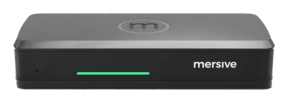
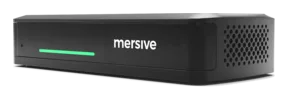
Essentials runs the same Polaris software as Pro: the same workspace, the same cloud, the same security posture. The differences are the chassis, not the platform.
Both tiers support cross-network sharing. Choose Pro when a laptop call needs the room’s camera and microphone, a room needs two displays, or a source needs a wired HDMI input. Choose Essentials for sharing to a single display.
- Use Polaris Link to connect a laptop call wirelessly to the camera and microphone attached to Pro.
- Drive two displays and accept a wired HDMI source.
- Share across campus networks using the same Polaris software as Essentials.
- Manage the room alongside your other Polaris devices in Polaris Cloud.
Pro has a practical ceiling of around 10 simultaneous workspace shares, limited by its hardware memory. Polaris Link is released and requires Pro, which controls the room’s cameras and peripherals.
- Share multiple sources side by side on a single display.
- Join from a supported laptop or desktop browser, including Chromebooks.
- Share across VLANs and over the internet once the required network access is configured.
- Use the same Polaris Cloud console as your Pro rooms.
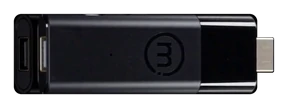
Essentials has a practical ceiling of around 5 simultaneous workspace shares, limited by its hardware memory. It does not support Polaris Link or wireless use of the room camera and microphone in a laptop call. Those uses require Pro hardware.
- Planned for wireless sharing and digital signage.
- Designed around a single live source.
- Planned to join the same Polaris Cloud console as your other Polaris rooms.
Planned for Q1 2027. Not available to order yet.
Essentials and Pro offer subscription and perpetual license options. Subscription terms are billed upfront, then renew annually at the published renewal rate. Full warranty while on active subscription; on a perpetual license it is capped at seven years. Education rooms are licensed perpetually. See the product pages for purchase options, or find a Mersive partner for an education quote based on your rooms.
Share across networks. Manage rooms centrally.
Use the same sharing platform across your Polaris rooms, with central tools for the people who configure and support them.
Share across campus networks
A researcher can share work from another building, or a guest can join from a separate network. Web-join supports these connections on both Essentials and Pro once the required network access is configured. Native casting uses a local connection to the room; use web-join when the sharing device is on another network.
Explore cross-network sharing →Manage rooms centrally
Create templates for different room types and apply changes from Polaris Cloud. Editing a template re-applies it to every device assigned to it, so a room that was changed locally comes back to the approved profile. Schedule firmware work around teaching, and update a small group of rooms before proceeding with the rest. Configure email recipients and alert preferences for device health and firmware events.
Explore Polaris Cloud →Keep the shared workspace in view
The room’s workspace is mirrored live to people who join at app.mersive.com. Remote students see the same shared sources and layout. Students on a supported laptop or desktop browser can also share their work into the workspace.
Polaris Pro has two wired HDMI input modes, selected by the room administrator. Workspace tile is the default: the input joins the workspace alongside wireless shares and is visible to remote participants. Direct bypass (full-screen pass-through) sends the input straight to the room display, outside the workspace. Remote participants do not receive that feed.
See how the workspace works →Texas A&M University’s case study, published in 2025, describes a Solstice Gen 3-era deployment. These figures and this quote refer to that deployment.
“Students and professors expect wireless sharing to just work, like it does on their phones. Now, it does.”
Read the Texas A&M case study, or explore other campus deployments in the case-study library.
See it in your own rooms
Request a hardware trial of Polaris Essentials or Pro. Test sharing with faculty devices, campus networks and a representative teaching room. Include your existing integrator from the start.
Request a free trial