
Meeting room technology becomes difficult to operate when every room is a custom project. Different cables, controls, meeting services, wireless receivers, cameras, and support instructions create a portfolio that may work one room at a time but fails as a system. Standardization gives users predictable journeys and gives IT and AV teams a manageable fleet.
The goal is not to make a two-person focus room identical to a divisible auditorium. It is to standardize the decisions that should remain consistent: room types, supported meeting models, content sharing, security, management, documentation, ownership, and lifecycle.
- Standardization is defining repeatable room types and common operating rules, so users get a coherent experience and IT and AV can run the fleet.
- Room-by-room design may work one room at a time but fails as a system.
- The goal is not to make a focus room identical to an auditorium. It is to standardize the decisions that should stay consistent.
- Eight elements make up a standard: user journeys, meeting architecture, content workspace, AV and physical design, security, cloud management, support model and lifecycle.
- Standardize the experience rather than every component, and measure the standard once it is in place.
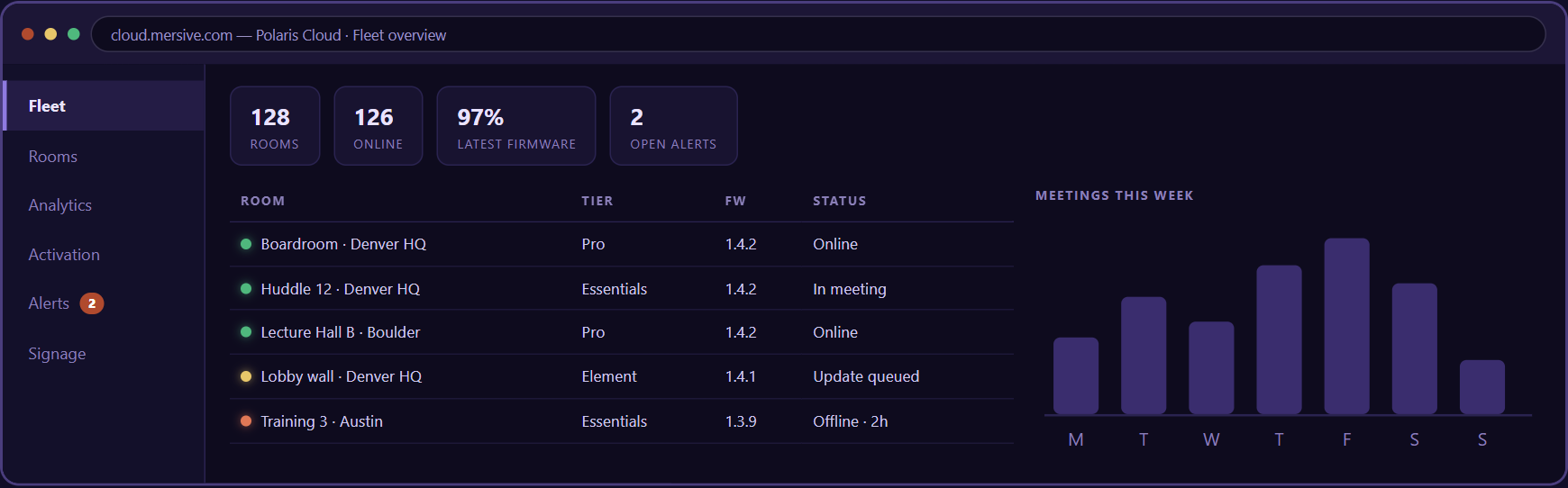
A multi-site room fleet with status indicators connected to one cloud operations layer.
Standardization means consistent participant journeys and centralized operations without pretending every room must be identical.
- HQ
- Regional office
- Learning center
- Remote site
- Cloud: configurations · health · updates · analytics · alerts · signage
Meeting room technology standardization is the practice of defining repeatable room types and common operating rules so users receive a coherent experience while IT and AV teams can deploy, secure, support, and refresh the fleet efficiently.
Why room-by-room design does not scale
Individual room projects often optimize for immediate stakeholders, available budget, or a preferred integrator. Over time, the exceptions become the fleet. Users encounter different instructions in adjacent rooms. Support teams need several diagnostic paths. Updates and replacements require unique knowledge. Procurement loses leverage because there is no stable bill of materials or lifecycle forecast.
A standard does not eliminate expert room design. It gives that expertise a framework: defined archetypes, approved components, known exceptions, and a process for change.
Build the standard around room types
- Focus room. Typical purpose: One or two people joining remote meetings. Standardization focus: Privacy, lighting, personal-device workflow, straightforward support.
- Huddle room. Typical purpose: Fast local or hybrid collaboration. Standardization focus: Simple start, guest sharing, suitable camera and microphone coverage.
- Conference room. Typical purpose: Team meetings, customer calls, reviews. Standardization focus: Defined meeting model, shared content, room AV, controls, platform policy.
- Boardroom. Typical purpose: High-impact meetings and complex content. Standardization focus: Resilience, production support, multiple displays, advanced audio and control.
- Flexible space. Typical purpose: Training, all-hands, divisible or changing use. Standardization focus: Room modes, routing, acoustics, facilitation, managed configuration.
The names can change. What matters is that each archetype has a documented purpose, capacity, meeting model, content behavior, security profile, support level, and lifecycle.
Eight elements of a meeting room technology standard
A workable room standard covers eight elements. Miss one and the gap shows up later as a support queue, an audit finding, or a room nobody trusts.
01User journeys
Document the few tasks that users must complete: start a local session, join an internal meeting, join an external invitation, share content, use room peripherals, add another contributor, get help, and end the session. Test employees and guests separately.
02Meeting architecture
Choose whether each room type uses BYOD, BYOM, room-hosted meetings, or an approved combination. Specify the primary path and fallback. Define which meeting services and invitation types are supported in each mode.
03Content workspace
Decide whether the room supports one mirrored source, presenter handoff, simultaneous contributions, local-only work, hybrid content delivery, or a shared room workspace. The content design should match the meetings the room is intended to support.
04AV and physical design
Specify displays, audio, video, control, inputs, mounting, lighting, acoustics, accessibility, cable management, power, network, and service access. Use approved alternates for supply constraints rather than accepting undocumented substitutions.
05Security and privacy
Apply defined network zones, identity, session authorization, data handling, administration, updates, logging, cleanup, and physical-room controls. A standard should identify which room types require stronger privacy, restricted guest access, or special approval.
06Cloud and fleet management
Define how endpoints are enrolled, grouped, configured, monitored, updated, audited, and retired. Establish naming conventions for sites, buildings, floors, rooms, device roles, and ownership so a dashboard can support action rather than become a list of inconsistent labels.
07Support model
Assign first-line support, escalation, remote diagnostics, on-site response, vendor coordination, spares, loaners, and service hours by room type. Put the user-facing help path in the room and give support teams the context needed to identify it.
08Lifecycle and change control
Define software policy, security updates, compatibility testing, hardware refresh, warranty, spares, end-of-support response, and exception approval. A room standard is a maintained product, not a drawing approved once.
Standardize the experience, not every component
A global standard can tolerate regional displays, approved camera alternatives, or different installation details when the user journey and management model remain coherent. Conversely, identical hardware can still create inconsistent rooms if settings, naming, network policy, instructions, or ownership differ.
- Keep consistent: room names, connection instructions, meeting paths, security policy, session cleanup, help, management, and lifecycle.
- Allow controlled variation: display size, microphone design, camera coverage, mounting, room control, and specialized sources.
- Require an exception record: business reason, technical owner, security review, support impact, expiration, and path back to the standard.
How to implement the standard
- Inventory the fleet: Capture room type, components, services, networks, age, health, support demand, and business importance.
- Analyze the work: Observe real meetings and classify local, hybrid, guest, content, and facilitation needs.
- Define archetypes: Create the smallest useful set of room types with approved architectures and bills of material.
- Pilot representative rooms: Include different sites, networks, users, invitations, and difficult physical conditions.
- Measure and revise: Track start time, successful first attempts, help requests, content sharing, availability, and participant feedback.
- Govern rollout: Control substitutions, configuration, documentation, training, monitoring, updates, exceptions, and refresh.
Metrics for a room standard
- User success: time to start, successful first attempt, successful guest share, and meeting completion without support.
- Reliability: room availability, recurring incidents, failed updates, component faults, and mean time to restore.
- Consistency: configuration compliance, standard coverage, expired exceptions, and variation within each room type.
- Adoption: use of approved sharing and meeting paths, room utilization, and avoidance of unmanaged alternatives.
- Economics: deployment cost, license cost, support labor, spares, refresh, downtime, and cost per active room.
- Experience: participant feedback, remote-participant access, accessibility issues, and confidence in selecting a room.
Where Mersive Polaris fits
Polaris is positioned as a common collaboration layer across the room fleet: the display becomes a shared workspace, users contribute through supported paths, and IT and AV teams manage the rooms through one cloud experience. That can let organizations vary room hardware and meeting models while preserving more of the user and management standard.
The opportunity should be proven by room type. Confirm the released product, tier, peripheral, network, hybrid, management, and security scope for every archetype. Then document which parts of the standard Polaris owns and which remain the responsibility of displays, AV systems, meeting services, networks, integrators, and internal teams.
Why standardize meeting room technology?
Standardization can make rooms more predictable for users and more manageable for IT and AV by reducing unnecessary variation in workflows, configuration, security, support, and lifecycle. The business value should be measured in the organization's own environment.
Does standardization mean every room is identical?
No. It means rooms are built from defined archetypes and common rules. Physical design and components can vary when the room's purpose requires it, provided that the variation is documented, supportable, and governed.
Who should own the meeting room standard?
Ownership is usually cross-functional. IT, AV, workplace, facilities, security, procurement, support, and business stakeholders should have defined responsibilities. One named product owner or governing group should coordinate the standard and change process.
How often should room standards be reviewed?
Review performance continuously and conduct a formal architecture and lifecycle review at least annually, or sooner when meeting platforms, operating systems, security requirements, product support, workplace patterns, or acquisition plans change.