
Secure collaboration platforms should help people work together without making security teams accept a black box. In a meeting room, the path may include employee and guest devices, native sharing protocols, browsers, room endpoints, cameras and microphones, network segments, cloud management, identity systems, logs, and software updates. A lock icon on the connection screen does not evaluate that system.
The right enterprise review asks what is trusted, what communicates, what data is processed, who can administer the system, how the platform changes over time, and which claims are supported by current evidence. This checklist gives security, IT, and AV teams a common structure for that review.
- A secure collaboration platform applies documented controls across devices, sessions, networks, room endpoints, cloud services, administration, updates and data handling.
- A lock icon on the connection screen does not evaluate the system; the review has to follow the whole path.
- Ten checklist areas cover identity, endpoint trust, networks, encryption, data retention, administration, updates, session cleanup, logging and independent evidence - each with pass-or-fail questions.
- Run the checklist along five participant journeys - employee, guest, peripheral user, administrator, update - because the gaps hide in the seams between areas.
- Security is also usability: controls people route around are not controls.
A secure collaboration platform applies documented controls across devices, sessions, networks, room endpoints, cloud services, administration, updates, and data handling so an organization can support collaboration within its risk and governance requirements.
Start with architecture, not features
A feature list can tell you that a platform supports encryption, authentication, or role-based access. It cannot tell you where those controls begin and end. Ask the vendor to diagram the system in the exact deployment under review.
- Trust boundaries: Identify where employee, guest, room, management, and third-party systems meet.
- Traffic paths: Separate discovery, signaling, media, content, identity, administration, telemetry, and updates.
- Deployment modes: Document how local-only, browser, cloud-assisted, cross-network, and hybrid-meeting workflows differ.
- Shared responsibilities: State what the vendor, customer, cloud provider, network team, AV team, and user each control.
- Failure behavior: Explain what happens when identity, internet, cloud management, certificates, or updates are unavailable.
If a vendor cannot explain the architecture without slogans, the organization cannot make a durable risk decision.
The checklist: ten areas, pass or fail
Each area below ends in questions with observable answers. Score them pass, fail, or needs evidence - and treat "needs evidence" as a fail until the document actually arrives. A platform that passes these in a live demonstration, on your network, is a platform whose security claims survive contact with a deployment.
01Identity and session authorization
Who can put content on the display, and how does the room know?
- Can session start and join be restricted to authorized users, with enterprise identity (SSO via SAML or OIDC) where policy requires it? Pass: the integration works against your identity provider in the pilot, not in a slide.
- Does a presenter confirm the destination room - an on-screen key or code, or equivalent - so content cannot land on the wrong display? Pass: a deliberate wrong-room attempt fails.
- Are presenter, moderator, room-administrator, and cloud-administrator privileges genuinely different? Pass: a presenter cannot reach room configuration.
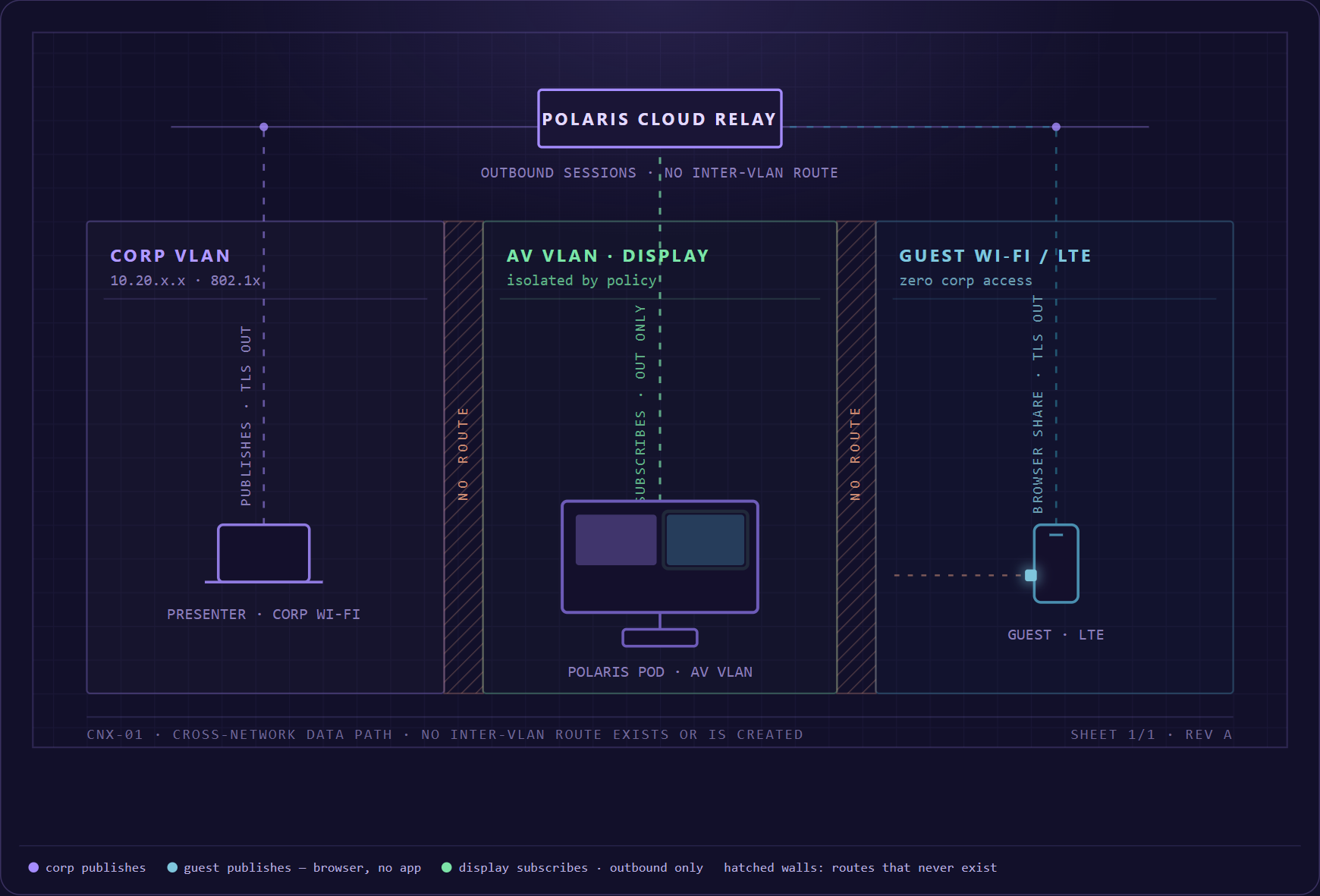
- Is the guest path bounded by design? Pass: a guest shares without a corporate account and without corporate network access.
02Device and endpoint trust
The room endpoint is a computer on your network; evaluate it like one.
- Which operating systems, browsers, and native protocols (AirPlay, Miracast, Google Cast) are supported, at which versions? Pass: a written support matrix, not "works with everything."
- What does the room endpoint run, and how is it hardened? Pass: the vendor names the operating system, the services listening on the network, and the protections - secure boot, signed firmware, no default passwords.
- How is physical and maintenance access controlled? Pass: local maintenance requires credentials your team holds, and a factory reset is detectable in the management console.
03Network architecture
Most collaboration-security failures are network assumptions, not weak cryptography.
- Must the source device and the display share a network segment, or is there a designed path across VLANs and the guest network? Pass: a guest-network device shares to a corporate-VLAN display in the pilot without a firewall exception.
- Which ports, protocols, and directions does the platform require? Pass: a published network-requirements document your network team can implement from directly.
- Does the endpoint support 802.1x network authentication where your switches require it? Pass: it joins your NAC-protected segment during the pilot.
- What stops working when the internet or the vendor's cloud is unreachable? Pass: the vendor states it plainly and the pilot confirms it.
04Encryption and key management
"Encrypted" is the start of the question, not the answer.
- Which protocol and version protects each traffic type - discovery, signaling, media, management? Pass: named protocols and minimum versions (for example TLS 1.2 or newer), per path, in writing.
- Where does encryption terminate, and does any hop see content in the clear? Pass: a data-path diagram with the termination points marked.
- How are certificates and keys issued, stored, and rotated - and can you install your own CA certificates? Pass: a documented rotation process and, where policy requires it, custom CA support demonstrated.
05Data inventory and retention
You cannot govern data nobody has listed.
- What does the platform process - shared content, audio, video, room codes, device and user identifiers, IP addresses, telemetry, logs, support bundles? Pass: a data inventory that names each category.
- For each category: where is it stored, by whom, for how long, and how is it deleted? Pass: retention periods with numbers in them.
- Does shared content persist on the room endpoint or in the vendor cloud after the session ends? Pass: the vendor states exactly what remains, and the pilot's cleanup test agrees.
06Administrative security
The management plane is the highest-value target in the system.
- Is administrative access governed by role-based access control, multifactor authentication, and single sign-on, with separate room and fleet scopes? Pass: the roles are demonstrated, MFA is enforced, and there is no shared administrator account.
- Are administrative actions audit-logged and exportable? Pass: you watch an action appear in the log, then export it.
- How fast does a departed administrator lose access, and how does vendor support access work? Pass: deprovisioning follows your identity provider automatically, and support access is logged and consent-based.
07Software updates and vulnerability management
Every room device is only as secure as its last update - and its next one.
- Are updates cryptographically signed, and does the endpoint verify the signature before installing? Pass: stated in writing; unsigned updates should disqualify a vendor.
- Can updates be staged by ring - pilot rooms first, the rest of the fleet on your schedule? Pass: demonstrated in the management console, not promised.
- How are vulnerabilities received, triaged, fixed, and disclosed? Pass: a public vulnerability-disclosure policy, plus a named support window for each hardware and software version.
08Secure session cleanup
The end of the meeting is a security event.
- When a session ends, what is cleared - content, thumbnails, cached files, room codes, granted browser permissions, signed-in accounts? Pass: a stated list, verified in the pilot.
- What happens when someone walks away without disconnecting? Pass: a timeout clears the session without a help-desk ticket.
- Does cleanup survive the unhappy paths - a network drop, an endpoint reboot, power loss mid-share? Pass: tested, and the display returns to a clean idle state every time.
09Logging, monitoring, and response
When something goes wrong, this area decides whether you can find out what happened.
- Which security-relevant events are recorded - session starts, administrative actions, update installs, failed authentications? Pass: an event list, with export to your SIEM or log platform.
- How long are logs retained, and how is time synchronized? Pass: retention numbers and NTP, not "logs are available."
- What is the vendor's incident process - detection, customer notification, evidence preservation, remediation? Pass: a written process with notification timelines.
10Independent evidence
Questionnaire answers are claims; documents are evidence.
- Certifications and attestations, with scope: which products and services does the ISO 27001 certificate or SOC 2 report actually cover? Pass: you have read the scope statement, not the badge.
- Current architecture and deployment documents, penetration-test summaries where available, and - where relevant - a software bill of materials. Pass: dated within the current cycle, not three years old.
- Remediation status for material findings. Pass: the vendor tells you what was found and what changed because of it.
Walk the checklist through five journeys
The ten areas say what to verify; the gaps hide in the seams between them. So run the checklist along the paths people actually take through the system. For each journey, one risk question matters most - and one set of documents answers it.
| Journey | The risk question | Evidence to request |
|---|---|---|
| Employee shares natively | How is the correct room discovered, authorized, and protected on the local network? | Protocol, network, authorization, and session diagrams |
| Guest joins through a browser | What access does the guest receive, and where do content and identifiers travel? | Browser support matrix, data flow, permissions, retention |
| User accesses room camera and mic | Which device controls peripheral access, and how is consent shown? | Peripheral architecture, permission model, session indicators |
| Administrator manages the fleet | How are identity, privilege, audit, and support access controlled? | Role matrix, identity integration, audit-log samples |
| Endpoint receives an update | How is software built, signed, delivered, verified, and recovered? | Signing and rollout documentation, rollback procedure |
Security is also usability
When an approved sharing path is difficult to understand, users create alternatives: personal meeting links, unknown adapters, unmanaged receivers, screenshots sent through messaging tools, or broad guest-network exceptions. A secure design should make the intended behavior clear enough to be the natural choice.
This does not mean removing meaningful controls. It means aligning room instructions, session indicators, guest access, destination confirmation, and cleanup with the security model. People should understand when sharing is active, what is visible, which room they selected, who else is connected, and how to stop.
Run the checklist in a pilot
A pilot is where the checklist stops being a document. Three rooms are enough if they are the right three: an ordinary conference room, a guest-heavy room on a segmented network, and the most locked-down room you operate.
- Score every checklist item in those rooms as pass, fail, or needs evidence - during the pilot, not from memory afterward.
- Run the five journeys above with real people: an employee, an actual visitor, a room administrator, a cloud administrator, and a security reviewer watching the network.
- Capture the artifacts as you go - network captures, permission prompts, log excerpts, cleanup behavior - so the approval decision cites the pilot rather than the brochure.
- Close with a written deployment scope: the products, versions, networks, and room types the approval covers, and a named owner for every control.
Where Mersive Polaris fits
Mersive Polaris positions security as part of the platform architecture: approved ways for employees and guests to contribute, support for segmented environments, a managed room endpoint, and centralized administration. That story can be compelling to enterprise buyers only when it is backed by a current, scoped data-path description and technical evidence.
The proof is meant to be checkable rather than asserted: Mersive publishes its security architecture, deployment prerequisites, and update policy in the open, so this checklist can be run against documents instead of a questionnaire cycle. Run it the same way against every vendor on the shortlist - the ones that welcome the exercise are telling you something too.
What makes a collaboration platform secure?
Security comes from a documented architecture and operating model across identity, devices, networks, encryption, data handling, administration, updates, logging, session cleanup, and lifecycle. No single feature proves that the entire platform is secure for every deployment.
Is encrypted screen sharing automatically secure?
Encryption is important, but it does not address wrong-room selection, unauthorized participants, weak administration, excessive retention, vulnerable endpoints, unmanaged updates, physical-room privacy, or user workarounds. Evaluate the complete path.
Can guests share securely?
A platform can provide a bounded guest workflow, but the design must specify authorization, network access, data flow, browser or application requirements, session visibility, logging, and cleanup. Validate the exact deployment rather than assuming 'guest mode' has one standard meaning.
Which certifications should a buyer require?
Requirements depend on industry, data, geography, procurement policy, and deployment. Evaluate the scope and date of any certification or attestation, what products and services it covers, relevant exceptions, and the supporting controls. A badge without scope is not sufficient evidence.