Share from any browser or native protocol. There is naught to install.
Any meeting. Every display. One platform for sharing screens without wires.
Mersive Polaris maketh any display a shared workspace. Laptops share from a browser tab, phones from the Mersive app or a native protocol. Side by side, many at once, across any network whatsoever.
No client to installAny meeting platform thou wiltISO 27001 certified, SOC 2 attested
9K+houses the world over
200K+rooms under governance (cloud & on-prem)
15 yrsthe line from Mersive Solstice to Polaris
10 yrsa platform lifecycle pledged
2×AVTechnology Best in Show & the SCN Installation Product Award, InfoComm 2025 & 2026 (Polaris · Host, shown at InfoComm as the Mersive Tablet)
The platform
Four labours, one Polaris platform.
Polaris graceth every display with screen sharing without wires, hybrid meetings and digital signage. Polaris Cloud is the single pane that deployeth, watcheth and updateth all three: every room, every site, one login.
A Polaris room runneth the meeting platform chosen for that meeting, not one bound fast unto the room.
Polaris rooms run the vendors' own native clients, so the chat, the layouts and Copilot are those that Microsoft and Zoom shipped, not a re-rendering of them within another vendor's workspace. Which platform a room runneth is chosen meeting by meeting, not fixed at install: pass from Teams to Zoom betwixt one meeting and the next, with no reboot and no swap. And with Polaris Host, BY letteth the room run and command the hybrid meeting itself, requiring no user's device. Which vendors re-render and which do not, in their own words, upon the compare matrix.
Polaris shippeth with secure boot, upon a supply chain true to TAA.
ISO/IEC 27001:2022 certified, with no nonconformities at the June 2026 surveillance audit. SOC 2 Type 2 attested for the Polaris cloud, and the room's device assessed by a third party. The application assessment of July 2026 returned no critical and no high-severity findings. 802.1x/EAP-TLS upon the wire, and all of it written down where thy security team may read it.
The Polaris workspace holdeth every share side by side, commanded from any seat.
A workspace truly composed: compared, annotated, rearranged live. A panel composeth upon its own glass alone. Polaris composeth and then encodeth the whole workspace back out, both to remote participants who never joined a call and to a browser on any device. That is parity in meetings: all within the room and all afar behold the same content at the same moment, with no view of the second rank. That is the line the panel vendors have not crossed.
Polaris shareth across VLANs, subnets, buildings and the internet, with no VPN.
Mersive doth the signalling alone: the cloud presenteth the two ends one to the other, then steppeth aside, and the media floweth peer to peer over a direct, encrypted WebRTC connection. Thy content never crosseth our cloud. Signalling goeth outbound only, TLS on port 443, so guests, other VLANs and distant devices reach the room with no VPN and naught inbound to open.
The troubles that bring folk hither, and wherefore Polaris is easy for all who must live with it.
01Trouble
Dongles are lost, and the cost thereof never endeth.
A dongle is a separate purchase of hardware, for each seat, and when one goeth astray another must be bought. 'Tis also one more piece of stock to keep, to tend, and to hold connected to thy network.
01Remedy
Easy for the keeper of AV
Polaris shareth from the browser, upon the device the person already beareth. Naught to buy for each seat, naught to lose, naught to keep in a drawer.
Every room upon one cloud pane: deploy, watch, and update the whole fleet from thy desk. Fewer tickets, fewer truck rolls, a lighter burden of support.
Sharing commonly meaneth bringing the visitor onto the corporate network first: an app to install, an account to make, or a firewall exception to petition of IT. The deck abideth on their laptop whilst the room doth wait.
02Remedy
Easy for him that useth it
A guest shareth from the browser without joining the corporate network: no app, no account, and no firewall exception to petition for.
Walk in, open a browser, share. No app, no download, no schooling, guests withal.
The room is chained to one meeting platform and one OEM.
A certified room system hosteth one platform's meetings by design, with one vendor bolted fast unto the room, a vow to that ecosystem for the life of the hardware.
03Remedy
Easy for the integrator, forsooth
Polaris careth not which meeting system users would deploy, and passeth from one to another in seconds. No reboot, no swap. Link shippeth upon Polaris Pro alone, whilst Polaris Host may be added to any Polaris Pro or Essentials room.
One cable to the display, PoE+ power upon Pro (Essentials useth the 12V adapter), activation by the cloud: from rack to running in haste, and quotable from an open spec sheet.
Founded on software — enabled by hardware. Installed but once, bettered every quarter.
Wares founded on hardware do not grow old; they cease to improve. A Polaris subscription keepeth advancing: updates, security and new capabilities, with warranty for as long as thou subscribest. No forklift upgrades, no care contracts.
Should a subscription lapse, the room becometh no brick: local sharing without wires worketh still.
10+YEARS · ONE INSTALL ALONE
Screen sharing and mirroring without wires
Choose thy Polaris hardware
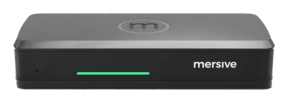
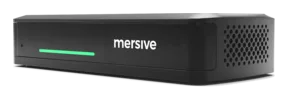
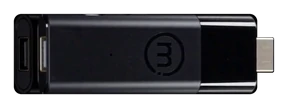
Polaris is one platform, offered in three chassis. All three run the selfsame software and open the selfsame Mersive workspace. What groweth with the hardware is I/O, how many sources may share at once, and what the room can drive.
One software platform · three hardware versions, sized to fit every room
Polaris beginneth where native screen mirroring endeth. AirPlay, Miracast and Google Cast each yield the display to one device at a time. Polaris setteth the Mersive Workspace behind them: a shared canvas whereon many sources sit side by side at once, arriving by native cast or straight from a browser. The workspace is not bound unto the LAN. A guest seated in the room, a colleague upon another VLAN and one on the far side of the world all reach the same room over the internet, with no VPN to raise, no network to join and naught inbound to open.
The workspace is not upon the wall alone. app.mersive.com rendereth the selfsame workspace for every seat, in the room or afar, so those who stand not before the glass behold no lesser view of it. And every display runneth from one cloud, be it a single room or a fleet of thousands. Three layers make it work:
The glass
Any display thou already ownest becometh a Polaris endpoint: a meeting room display, a classroom screen, a lobby wall.
The workspace
Every share alighteth side by side upon the display, from a laptop, a phone, or a browser with naught installed, and from any network, not the room's alone.
The cloud
The broker and the console of the fleet: it introduceth every session, runneth every room, and keepeth out of the path of the media.
How a share doth reach the room
Scroll thou: the same three steps that every share taketh, be the person in the room or on the far side of the world.
1JoinDevices call out unto Polaris Cloud, which doth authenticate them, resolve the screen key, and trade SDP and ICE.
2ConnectThe cloud doth make introductions and then stand aside. Media travelleth on direct links to the pod: within the room it never leaveth the building, and from without it never toucheth a VPN.
3ComposeShares alight side by side upon the display as one workspace, and that selfsame workspace rendereth live in the browser for all who are not in the room.
Polaris hath two ways to lift the meeting off the laptop.
Most rooms manage BYOD and halt there: thy laptop hosteth, and the room is but a screen. To go further commonly meaneth giving somewhat up: a room chained to one meeting platform, or a bridge that costeth thee the native client, so chat, recording and Copilot are no longer those Teams or Zoom shipped. Polaris hybrid meeting technology offereth a remedy that serveth any platform, whilst keeping the native client's every function.
At Mersive we discern three models of room furnished for hybrid meetings. BYOD showeth the meeting upon the room display but lacketh union with the peripherals. BYOM addeth the room's peripherals to the meeting, letting the meeting use devices such as camera bars without wires. BYOM remedies may also host the meeting upon either the user's laptop or the room's device. Polaris Link is Mersive's BYOM remedy and is included in Polaris Pro. Our Link remedy moveth the meeting onto the Polaris Pro, thereby lessening the laptop's draw of power and its need of compute.
At Mersive we discern a third model of hybrid meeting room, a room system fully furnished, which we call "BY", for bring yourself. In such rooms a user may hold a hybrid meeting without a device of their own. Polaris Host is Mersive's "BY" remedy, and it is sold as an add-on to either Polaris Pro or Polaris Essentials. With Polaris Host, the room hosteth and is commanded from the device, so none need bring a machine at all.
Neither Polaris Link nor Polaris Host doth chain the room to one VTC platform. The platform is chosen meeting by meeting, every client is the vendor's own, and to change from one to another taketh seconds and no reboot.
The three sorts of hybrid room
1 · BYOD: thy device aloneThy screen upon the glass, VTC client and all. The room showeth what thy laptop showeth, yet addeth naught to the call: the laptop's own webcam and mic do carry it. "Whose microphone shall we use?" and "who must go mute?" are common troubles for users.2 · BYOM: the laptop or the pod doth hostThe meeting gaineth the peripherals. BYOM bringeth the room's system and peripherals (a camera bar, say) into the call, and the meeting client may run on either side: thy device, or the room's. Polaris Link hosteth it upon the Polaris Pro hardware, lifting the burden of memory and power from thy laptop.3 · BY: Polaris Host"BY" maketh the room the host system. It starteth, ruleth and shareth the hybrid meeting itself, with no user's device required. Polaris Host, wed unto a Pro or Essentials, doth it without the vendor's lock-in: the native Teams, Zoom, Webex or Meet client, chosen for each meeting and changed in seconds.
cablewireless unto Polarishost of the meeting✕not within the meeting
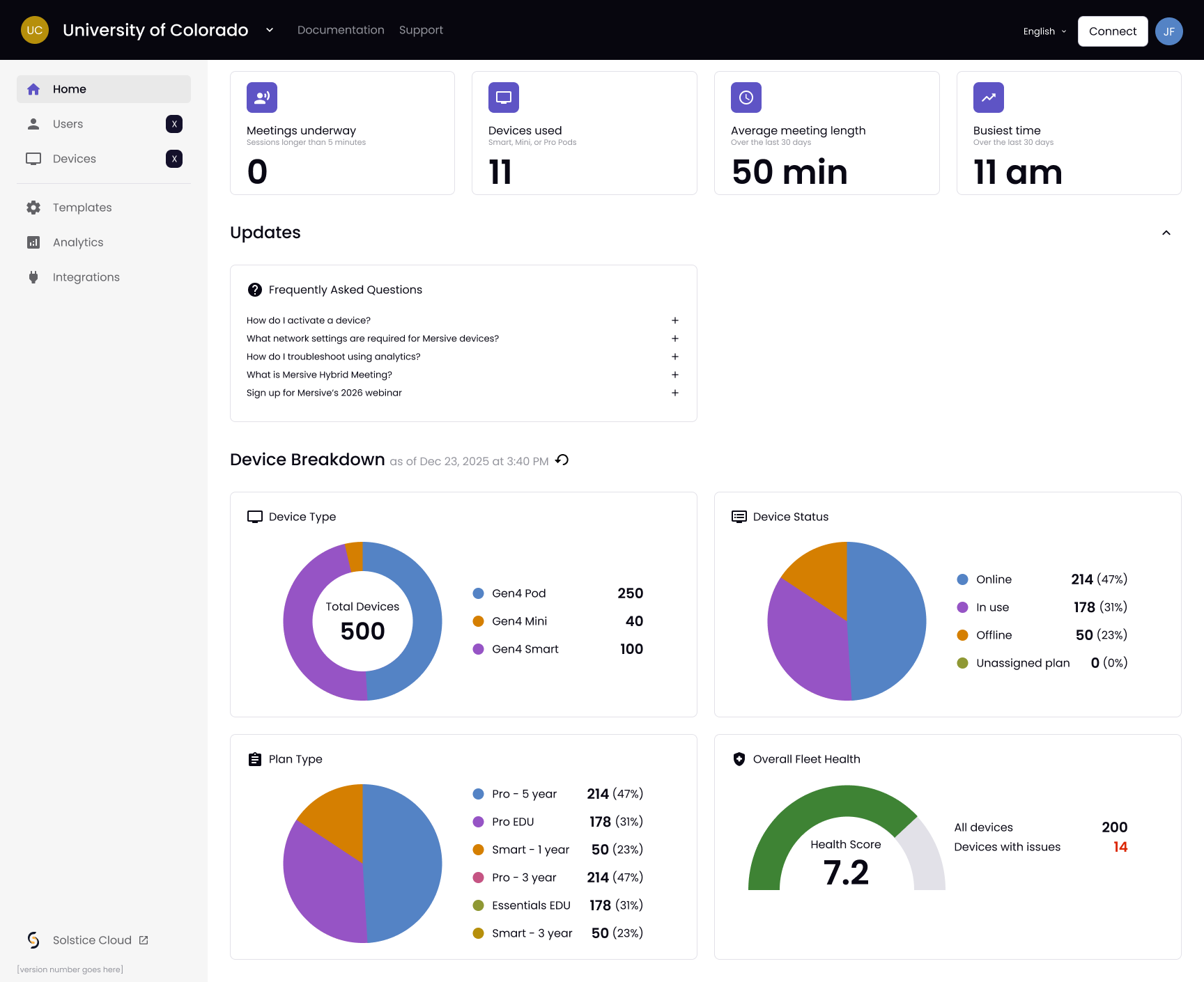
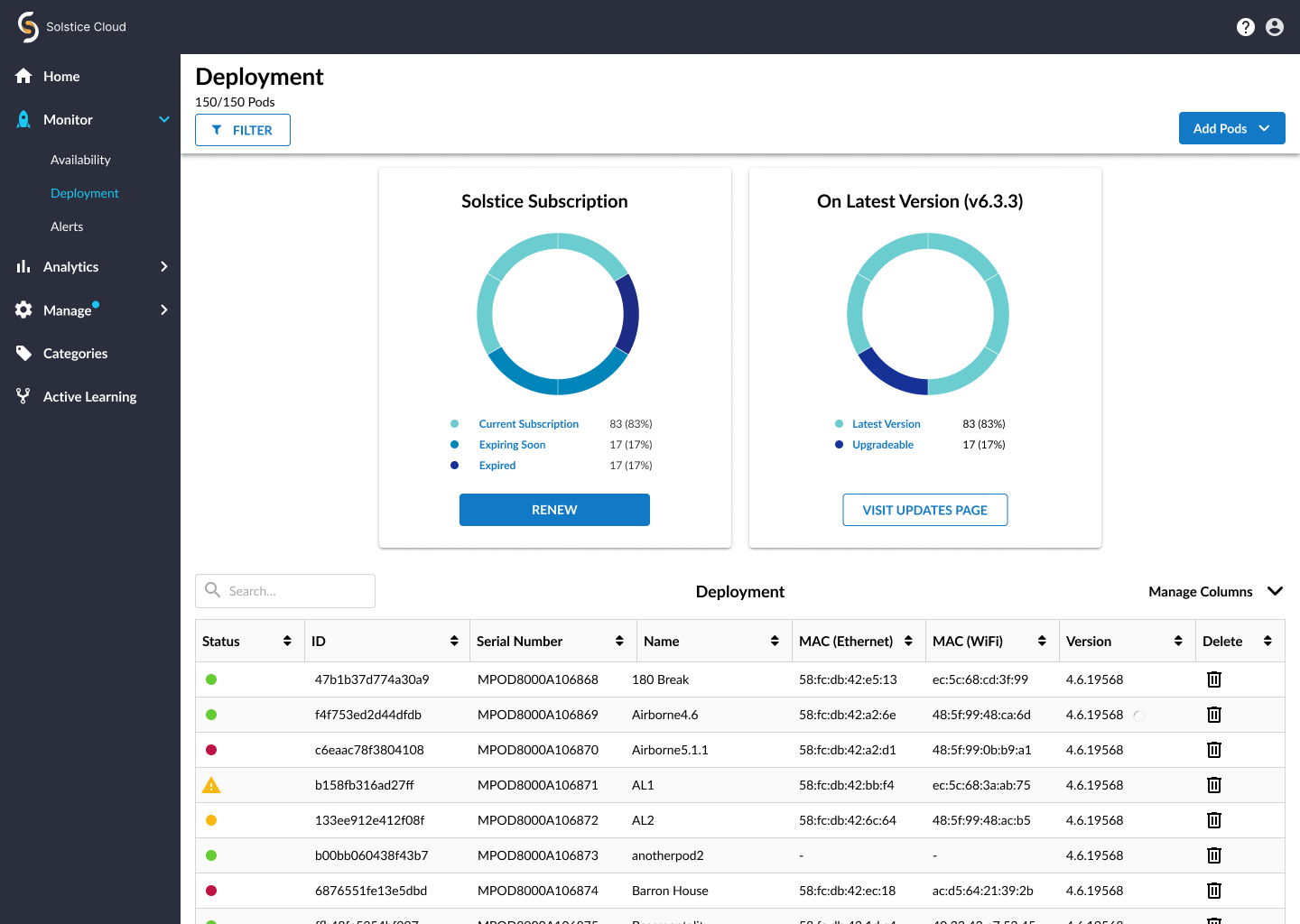
Polaris Cloud beareth analytics, activation and conference room governance for the whole fleet. One login deployeth, watcheth and updateth every room on every site: templates by kind of room, firmware in stages, alerts of ill health.
The Polaris Cloud panel: the home dashboard. The Solstice Cloud panel: the Deployment view. Both are screenshots of the ware, with sample data.
Conference room governance ceaseth to be a labour building by building. One login deployeth, watcheth and updateth the whole fleet from thy desk: templates by kind of room, so that a huddle room and a lecture hall each arrive configured as that kind of room should be; firmware staged over a weekend instead of pushed upon a Tuesday morn; and alerts of ill health that reach thee ere the day's first meeting findeth the dead display. Fewer tickets, fewer truck rolls, and a burden of support that ceaseth to swell each time someone addeth a room.
None of it waiteth for a migration to be done. Mersive Solstice Cloud goeth on running thy Gen 3 fleet exactly as it doth today, and is linked straight from Polaris Cloud, so the two sit side by side and rooms cross over when the budget sayeth so, not when the software insisteth. One starting place, one login, and no weekend whereon half the buildings go ungoverned.
How Polaris Cloud worketh, and what it delivereth
Activation and governanceEvery pod activateth against the cloud and joineth the fleet at its first boot. One login deployeth, watcheth and updateth every room on every site.
Templates and configurationConfiguration is a template, not a journey to the site: define a kind of room but once and the hundredth room deployeth like the first, firmware in stages withal.
Analytics and watchfulnessHealth, alerts and the analytics of usage flow back from every room, so the amber tile findeth thee ere the ticket doth.
Corporate digital signage is commonly a second system: another platform, another licence, another vendor to summon when the lobby screen goeth dark. Here 'tis the platform the meeting rooms already run. The selfsame Polaris Cloud login runneth both.
The meeting display thou already ownest, ere the meeting endeth and after. The same pod, the same login.
A screen set apart in a lobby, a hallway or a cafeteria is a deployment like any other. The difference lieth in what befalleth the displays thou hast already bought: a meeting display becometh a signage screen the moment none is sharing, which across a working week is most of the time it is switched on. Rooms that once sat dark between bookings now publish instead.
Content is dynamic and driven by events, and it is cached upon the device, so a screen keepeth publishing through a network outage rather than falling to a blue holding slide before all in the lobby. Every panel is addressed from the selfsame Polaris Cloud login as every room, so there is no second CMS to learn and no separate fleet to keep account of. Signage is included, not licensed on its own: no second network of players, no second licence, no second vendor.
Where signage doth truly run
Five ways to feed it, one cloud to publish it, any chassis to run it. A meeting display becometh a signage screen the moment none doth share.
Screens set apart for signageLobbies, hallways, cafeterias, whole floors: Polaris driveth displays for signage alone as a deployment, dynamic and driven by events, cached close at hand.
The rooms thou already ownestMeeting displays double as signage the moment none is sharing. Launch setteth signage upon any other screen for a cost paid but once, all within the same Polaris Cloud pane.
Hardware locked fastSecure boot: the lobby screen runneth only firmware we have signed and content thou hast published.
Proof in the field: the headquarters of one customer in hospitality took 350 units, the most part of them driving signage.
Rogue signals do jam the airspace above the room. Thou art the pod — clear the channel. Jammers rain down static, splitters multiply, and every fourth wave the FIREWALL sweepeth in. Signals felled do drop powered displays: relay shield, dual beam, the piercing LANCE and the wide-angled SWEEP.
The shares come ever on. Compose the workspace — complete a row and it rendereth to the display. Hold a piece for anon, trust thou the ghost, and slam it home when thou art sure.
thy score: 0 · lines: 0 · level: 1 · best yet: 0
Mars · canyon relay
RELAY RUN
Aliens are looting Earth's audiovisual gear, and someone has to invoice them for it. You're the AV Integrator: fight through three decks of their freighter, shoot the capsules open, and take the equipment back — HDMI becomes a Blaster, a Display fans into Multicast, Coil fires Fiber, a Speaker is pure Subwoofer. Switches level your weapon, Surges take one hit for you. Snatchers steal; make them regret it. A boss holds every deck.
score: 0 · mission: 1/3 · best: 0
Pluto · tending the deep network
PACKET MUNCHER
Some thing doth nest within the farthest switch fabric. Run thou the corridors, devour every stray packet, and mark the four interference glyphs — each hunteth after its own fashion. Seize a powered display and, for some few seconds, the hunters become the hunted. Ten sectors lie 'twixt thee and a clean network.
Ten displays across the broadcast campus have gone dark, and the interference strutteth about as though it owned the place. Run thou the loading dock, the cable trench, the rooftop, the mezzanine and the antenna tower, then press on through the uplink yard, the static fields, the rack canyon, the microwave bridge and master control — stomp the glyphs flat, bank the signal bits, bump the cache blocks, plant the midpoint flag, ride the ferries, and touch every display back to Polaris green. When the game is done, a CONTINUE is offered from the top of the level that bested thee.
The campus's flagship display was stolen and walled up within a fortress beyond the north-east mesa. Cross thou a hundred screens of field, wood, river and dead server yard, crimper in hand — find the two small keys, beware the spikes, arrows and false floors, put five strikes into the CRT TYRANT's open screen, and raise the display where it doth belong. Five hollow caves do hide heart containers, and the RELAY TOWER upon the south-west shore keepeth the MERSIVE POLARIS — press X to seize what lieth before thee, or to send the puck flying out and back.
The dongle users pour forth from the rings in formation: HDMI drones, button wingmen, and the great conference pucks that rule the show. Hold thou the line in the Polaris fighter. They swoop in, regroup, take breath, and dive. Beware the boss pucks' PAIRING BEAM — be caught, and thy fighter is theirs. Shoot that boss down mid-dive and thy fighter cometh home to fly beside thee: DUAL FIRE. Every fourth wave is a stage of show — pure flight, pure bounty, PERFECT if thou fell'st every last one.
thy score: 0 · wave: 1 · lives: 3 · best yet: 0
Mercury · the circuit of the night side
THE SOLAR CIRCUIT
A course cut across Mercury's night side, from Point A unto Point B, against the clock. The sun here never setteth, nor doth it ever rise — it sitteth upon the horizon, flinging its corona up the sky, and all thou canst see is either lit by it or hiding from it. The way openeth wide and swift, narroweth to a canyon scarce three lanes across, climbeth, and falleth away again, four stages thereof. Keep thou to the basalt: the regolith on either side will drag thee down and take thy speed withal. Ride clean and the craft findeth ever more — the longer thou holdest the line, the faster it shall let thee go, and the yellow pads are how thou gettest there the sooner.