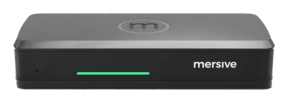
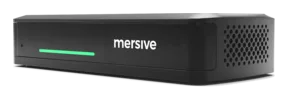
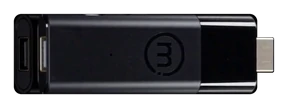
- Who dwelleth here: certified room systems and video bars running Microsoft Teams Rooms or Zoom Rooms.
- Cost: a licence for each room, for each year, atop the hardware.
- Clients: one ecosystem by default. To join the other platform's meeting is a guest's experience, cut short.
- Sharing: built about the starting of a call, so all in the room stare at their own laptops instead of labouring together.
- The snare: well enough until the house signeth a second platform. Then every chained room is a renovation.
BYOD, BYOM, or BY: where doth thy meeting dwell?
Two questions sort every hybrid meeting room e'er built: where is the meeting hosted, and is the room chained to one meeting client or open to them all.
The three models of hybrid
What, pray, is a hybrid meeting?
A hybrid meeting is one wherein those in the room and those afar meet as equals. Mersive seeth hybrid meetings in three several models:
- BYOD (bring your own device): thou sharest thy screen and the VTC client unto the room display. Those within the room touch not the room's peripherals, such as cameras, speakers, and microphone.
- BYOM (bring your own meeting): the room's camera and mic join the call. The meeting client may be hosted upon thy laptop or upon the pod.
- BY (bring yourself): the room hosteth the meeting and beareth its own control surface, a touch panel within the room, so participants join, start and run meetings bringing naught at all.
Polaris Link hosteth it upon the Polaris Pro hardware, lifting the burden of memory and power from thy laptop. The laptop abideth in the room either way, for it is still the control surface for starting, running and ending the meeting.
Polaris Host, wed unto a Pro or Essentials, doth it without the lock-in: the native Teams, Zoom, Webex or Meet client, chosen for each meeting and changed in seconds.
cablewireless unto Polarishost of the meeting✕not within the meeting
The map of the market
The market of room systems at a glance.
The rows are the three models of hosting. The columns divide the market by the platforms upheld: rooms chained to a single meeting client upon the left, rooms that work with every client upon the right.
Chained to a platform
Careless of platform
BYBring yourselfThe room hosteth the meeting AND beareth the control surface: a touch panel within the room letteth participants join, start and run the meeting with full use of the room's peripherals, bringing naught at all.
Microsoft Teams Rooms, Zoom Rooms
One room, and every client
- Who dwelleth here: a small band of room systems for many platforms, among them bundles of dongle and base.
- Cost: the pricing of room systems, and at times two devices to buy and govern for each room.
- Clients: the most part either re-render the meeting in their own client, losing native features such as chat and Copilot, or run Teams and Zoom upon two separate surfaces of compute, the base unit and the dongle.
- The snare: two surfaces mean firmware versions drifting apart and two OAuth identity contexts for each room, and still no Google Meet and the rest.
- Polaris Host passeth seamlessly from Teams to Zoom to Google Meet and any other VTC client, keeping native features such as chat.
- One surface of compute and one identity for each room, at a fraction of the cost of the other systems capable of this.
- The touch panel within the room is the control surface, so participants join, start and run meetings bringing naught at all.
BYOMBring your own meetingThe room's peripherals (camera, microphone) are captured and used in the meeting. The meeting itself may be hosted by the user's laptop or by the room's device, the Polaris pod. Either way, participants still bring a device to start, rule and end the meeting: the control surface is what parteth BYOM from BY.
Certified bars, in USB mode
- Who dwelleth here: the great vendors of certified bars.
- Cost: goodly hardware, open in principle, priced to draw the room toward one ecosystem's certified mode.
- Clients: any, for the laptop hosteth and ruleth the call. The bar is its USB peripheral.
- Wireless: none. BYOM here is a USB-C cable stretched across the table.
Without wires, and done wholly
- Who dwelleth here: the vendors of wireless BYOM.
- Cost: the room's device, and in most cases a transmitter for each room or each laptop.
- Clients: the room's camera, mic and display join the call already running upon thy laptop, whatsoever platform it be.
- Wireless: aye, with a snare apiece. A transmitter in the laptop, a web client instead of the platform's own, or release notes confessing that multi-view is not to be had during a BYOM session.
- Polaris Link bridgeth the room into the Teams, Zoom, Webex or Meet call natively, over the air, with no transmitter and no web client.
- Any hardware: the USB camera, mic or soundbar thou already ownest plugs into the pod and worketh.
- Many users, and the workspace of many shares abideth live whilst the call runneth.
- When the meeting should leave the laptop entirely, the selfsame pod climbeth a row to BY.
BYODBring your own deviceThou sharest thy screen unto the room display, and what it showeth is commonly thy VTC client itself. Thou gettest none of the room's peripherals: no wall camera, no room microphone. The laptop's own webcam and mic do carry the call.
Casting within an ecosystem
- Who dwelleth here: the platform vendors' own paths of casting, Teams Cast and rooms of AirPlay alone.
- Cost: as good as naught, for it cometh with the ecosystem.
- Clients and devices: one vendor's world. Guests and mingled fleets do break it.
- Sharing: but one mirrored screen at a time.
All connect; the workspace is where they part
- Who dwelleth here: everyone. AirPlay, Miracast, Google Cast and vendors' apps are table stakes, and none winneth on the connection any more.
- Cost: from dongles given free to devices for each room.
- Clients and devices: broad, for to mirror a screen needeth no meeting client at all.
- Sharing: a mirrored screen that must bear everything at once. Across networks, the one rival that documenteth a cloud path shareth in and vieweth single streams.
- The display is a workspace: as many as 10 live sources composed side by side, joined from the browser with naught to install.
- The room chooseth what dwelleth where: the call upon the great screen with content upon everyone's devices, or the content aloft and the call upon thy laptop.
- The workspace crosseth networks in both directions, and the whole composed workspace streameth back unto every distant browser. None we know of returneth the room's whole workspace.
Where Polaris doth stand
BYOD is table stakes. All can set a screen upon the display, but for a hybrid meeting it hath a ceiling, for the call runneth upon someone's laptop with its webcam and its mic, so the room endeth staring at laptops instead of at one another.
BYOM mendeth that, and most vendors sell it with strings attached, commonly an add-on subscription and a short list of compatible hardware. Polaris Link beareth no list. It worketh with every meeting client, and because the pod runneth a full Linux operating system, standard USB video and audio class peripherals (UVC/UAC) work by default. The camera thou already ownest plugs in and worketh, with no programme of certified peripherals required.
BY taketh away the need of a user's device. The room system hosteth the meeting and beareth the control surface; and that control surface is what parteth it from BYOM. Even with Polaris Link hosting the call upon the pod, participants still bring a laptop to start, rule and end the meeting; a BY room hath a touch panel that doth all of it from the room itself. Today the BY experience is largely served by certified room systems that chain the room to one platform, at that platform's price. Polaris Host is built to match that experience at a lesser price and without the chain. Every client is the vendor's own, chosen for each meeting, and thy AV and IT teams choose the peripherals that fit the space and the purse, not the certification list.
Each rival giveth something up along the way, be it a transmitter in the laptop, a re-rendered client that droppeth chat, or a Teams Rooms licence upon hardware certified for naught else
✓ BYOD · every client✓ BYOM · every client✓ BY · every client, with Polaris Host (Shippeth Q4 2026)
A little glossary: the words this page doth teach
BYODBring your own device: thou sharest pixels unto the display; the meeting abideth upon thy laptop.BYOMBring your own meeting: thy call, with the room's camera and mic bridged within.BYBring yourself: the room hosteth the meeting and its touch panel is the control surface, so with full use of the room's peripherals a meeting runneth with no user's device in the room at all.
Behold the platform live.
Hardware trials ship for every ware, direct from Mersive. When the rooms have proved it, we shall present thy regional partner for the rollout.
Begin a trial Watch upon YouTube ↗