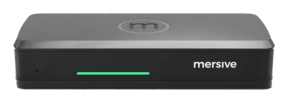
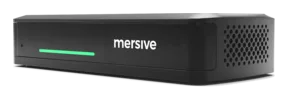
The Polaris Essentials spec sheet
Screen sharing without wires for every room: the whole workspace of many shares, at the tier most rooms truly need. Common meeting rooms, classrooms, huddle spaces, and every fleet where the room must run itself.
It printeth as a clean white datasheet with a date stamped upon every page. This page is the living version: share thou the link, not the file.

No lesser tier. The whole platform, bounded to rooms that share.
Polaris Essentials bringeth screen sharing without wires to great houses, small businesses, clinics, and seats of learning, without bidding anyone install aught. The compact Essentials appliance shareth content from any device unto the display, turneth idle screens into digital signage, and joineth the rest of thy fleet in Polaris Cloud, so every Essentials room is governed from the same pane as all else. What Essentials doth deliberately forbear is conferencing: rooms that share receive the whole workspace at the fitting price, and the rooms where meetings need hosting step up to Pro upon the same platform.
The whole workspace of many shares
As many as 5 live sources composed side by side, compared, annotated, and rearranged from any seat, laid out of themselves as sources join and depart. The selfsame workspace Pro runneth, so a mingled fleet is never a mingled experience.
Web-join: no app, no download withal
Guests and staff share from the browser upon the device they came in with, Chromebooks withal. No client, no admin rights, no drawer of dongles. The URL upon the display is the whole of the onboarding.
Native AirPlay, Miracast and Google Cast
The paths of casting thy devices already speak, built within. Users of Apple, Windows, and Chromebook share natively upon the LAN with no Mersive software at all, and every share alighteth upon the same workspace, side by side.
Sharing across networks
Guests upon LTE, staff upon corporate Wi-Fi, the display upon an AV VLAN: one workspace, no VPN. Signalling is outbound only, TLS on TCP 443, so there be no inbound firewall rules to beg for. Included upon every Polaris tier.
Governed by Polaris Cloud
Every Essentials room joineth the selfsame fleet pane as the rest of the fleet: analytics, firmware, alerts, health, and idle-screen signage, all from one login.
Sharing on the move
The Polaris app for iOS and Android: share thy screen, thy pictures, or a live whiteboard, and command the workspace from thy seat.
The Polaris Essentials hardware
Sharing & video
| Specification | Polaris Essentials |
|---|---|
| Shares at once | Polaris Essentials can at present uphold as many as 5 live sources, composed side by side |
| Paths of sharing | Web-join by browser (no app) · native AirPlay, Miracast, Google Cast (upon the LAN) · the Polaris app for iOS and Android |
| Protocols | WebRTC, AirPlay, Miracast, Google Cast |
| Codecs of video | H.264 encode and decode · H.265 encode and decode · VP8 decode · VP9 decode · AV1 decode · JPEG/MJPEG decode. In service: H.264 beareth AirPlay, Miracast and web-join over WebRTC; VP8 beareth Google Cast; VP9 decodeth the playback of digital signage |
| Resolution | 4K (4096 × 2160 @ 30Hz) · HD (1920 × 1080 @ as much as 30Hz) · (1280 × 720 @ as much as 30Hz) |
| Protection of content | ✓ HDCP 2.0 |
Compute
| Specification | Polaris Essentials |
|---|---|
| Chipset / SoC | MediaTek MT8370 (Genio 510): an ARM SoC with a Mali GPU |
| NPU: silicon for AI upon the device | NPU 3.2 TOPS (INT8) in the MediaTek documentation, 6.4 TOPS at the least precision (INT4), the custom MediaTek keepeth for its present Genio series. |
| RAM · storage | 4 GB · 32 GB eMMC: 19 GB free for storage, the rest holding the system image and the second partition, which beareth an OTA update and alloweth the firmware to roll back |
| The video pipeline: decoding many at once | H.264 and H.265 encode and decode; VP8 and VP9 decode — the selfsame codec surface as Pro, not a lesser one. Composeth into a 4K (4096 × 2160) 30 Hz output; 2+ concurrent 1080p30 decodes required, more upheld; the ceiling is 5 shares at once, set by the memory of the smaller chassis and not by licensing |
Network & security
| Specification | Polaris Essentials |
|---|---|
| Ethernet | 1× 10/100/1000 RJ-45. No PoE upon Essentials — the Pod taketh PoE+, the Mini doth not |
| Wi-Fi | MediaTek MT7921: Wi-Fi 6 (802.11ax), 802.11 a/b/g/n/ac/ax compliant, 2.4 + 5 GHz, MIMO 2×2; and Bluetooth (MediaTek MT7921) |
| Network protocols | TCP/IP, HTTP, HTTPS, SNTP/NTP, SSL, SSH and UDP |
| Security of the airwaves | WEP, WPA2, WPA2 Enterprise, or else IEEE 802.1X |
| Sharing across networks | ✓ included on every Polaris tier. Direct connections, brokered by the cloud; signalling goeth outbound only, TLS on TCP 443, so there be no inbound firewall rules to beg for, and no VPN |
| Security of the device | Secure boot required upon production firmware · a hardened Linux OS, built for the purpose · signed updates, guarded against downgrade · A/B firmware partitions, rolling back of themselves upon a failed load · Kensington Nano Security Slot |
In plain speech: 802.1X meaneth the network itself demandeth the device prove who it is ere granting a port. An Essentials room proveth itself to thy NAC with a certificate, like any governed endpoint.
Physical & of the clime
| Specification | Polaris Essentials |
|---|---|
| Rear panel | Kensington Nano Security Slot · Ethernet · HDMI 2.0 · DC power withal |
| Power | 12 VDC, 2 A, 24 W at most from the barrel jack; no PoE upon Essentials — the Pod taketh PoE+, the Mini doth not. The power supply lieth in the box |
| Dimensions · weight | 58 × 140 × 30 mm. Essentials and Pro are different chassis: Pro is 86 × 184 × 30 mm. Both released data sheets do print 150 × 67 × 30 mm and 204 g for both wares, which cannot be true of two different enclosures; the sheets are being issued anew |
| The clime of operation | For use indoors only · 0°C (32°F) to 35°C (95°F) · 30% to 70% RH about it |
| The clime of storage | From -20°C (-4°F) to 65°C (149°F) · 10% to 90% RH |
| Endurance of a fall | 1 m onto concrete along any critical axis — face, corner or edge — with no cables joined |
| ESD | IEC 61000-4-2 Level 4 · ±8 kV by contact · ±15 kV discharge through the air |
| Accessories | The Power Supply Unit (included) · HDMI cable (not included) |
| Regulatory | FCC (USA) · UL (USA/Canada) · CB Scheme / IECEE (of all nations) · UKCA (UK) · CE (EU) · RoHS (EU) · SCIP (EU) |
| Warranty | Full warranty whilst on an active subscription; upon a perpetual licence it is capped at seven years. |
| Licensing | 3-year or perpetual |
The device, too, is tested, and by another hand.
Secure boot is required upon production firmware, which runneth a Linux built for the purpose and pared to the bone: no Windows attack surface, no desktop for general use. 802.1X network authentication letteth an Essentials room prove itself to thy NAC with a certificate even as a Pro room doth. In May 2025 an outside firm of security took a Gen 4 Pod and a Gen 4 Pod Mini in hand — the smaller unit within scope in its own right — opened them, and assailed them in body: the debug headers, the flash, and a man-in-the-middle in the lab. No critical, high, medium or low-severity vulnerabilities were found upon either device. Their caveat, which we keep: this maketh not compromise impossible, but it would require an adversary of great skill and effort. Mersive's system for governing the security of information is ISO/IEC 27001:2022 certified, with no nonconformities raised at the June 2026 surveillance audit, and the Polaris cloud unto which this unit reporteth is SOC 2 Type 2 attested. The whole architecture and every statement of scope: the Trust Center.
Essentials and Pro, set side by side
| Polaris Essentials | Polaris Pro | |
|---|---|---|
| Shares at once within the workspace | As many as 5 | As many as 10 |
| HDMI output | 1× HDMI 2.0 out · 4K (4096 × 2160) at 30 Hz | 2× HDMI 2.0 out · twin 4K (3840 × 2160) at 60 Hz |
| HDMI input (ingest by wire) | — | 1× HDMI 2.0 in |
| Conferencing by true wireless BYOM | — | Included |
| USB for the room's peripherals | — | 2× USB 3.0 Type-C, in host mode |
| Audio out (unto soundbar / DSP) | — | Included |
| Power over Ethernet | — | PoE+ |
| The power supply unit | Within the box | Sold apart; PoE+ is the wont |
| Web-join, workspace, across networks, Polaris Cloud | Included | Included |
The whole platform's picture, Launch and the hybrid add-ons withal: the Polaris family.
©2026 Mersive Technologies, Inc. · 1667 Cole Blvd. Suite 225, Lakewood, in Colorado · mersive.com